How to use the 2D Barcode generator
- 1
Choose a symbology
Select Data Matrix, Aztec, PDF417, DotCode or Micro QR. If you are unsure, use the comparison table below, or follow the format your customer, regulator or carrier specifies.
- 2
Enter data and adjust
Type or paste the text, numbers or identifiers to encode. Set the scale, foreground and background colors, and rotation to suit your label layout. The preview updates as you type.
- 3
Export and test
Download SVG for print and label software, PNG for documents, or PDF for a printer. Press Ctrl/Cmd+S to save. Scan a printed proof with the reader your users will actually have.
Features
- Data Matrix, Aztec, PDF417, DotCode and Micro QR in one place
- Scale, colors, transparent background and 90-degree rotation
- Export SVG, high-res PNG or PDF, copy or print directly
- Generated in your browser with bwip-js; data is not uploaded
- Bulk Studio makes Data Matrix, Aztec and PDF417 from spreadsheets
How the main 2D symbologies compare
A 2D barcode stores data in both directions, horizontally and vertically, so it holds far more information in less space than a linear barcode such as EAN-13 or Code 128. All five formats here use Reed-Solomon error correction, which lets a scanner rebuild data from a symbol that is partly scratched, smudged or poorly printed. They differ in shape, density, quiet zone needs and the industries that standardized on them.
| Symbology | Standard | Max capacity (approx.) | Typical use |
|---|---|---|---|
| Data Matrix | ISO/IEC 16022 | 3,116 digits or 1,556 bytes | Pharma, electronics, part marking |
| Aztec | ISO/IEC 24778 | 3,832 digits or 1,914 bytes | Boarding passes, rail and transit tickets |
| PDF417 | ISO/IEC 15438 | 2,710 digits or 1,108 bytes | ID cards, shipping labels, documents |
| DotCode | AIM ISS DotCode | Varies with symbol size | High-speed inkjet, tobacco, cartons |
| Micro QR | ISO/IEC 18004 | 35 digits (M4) | Tiny parts, PCBs, small components |
How to choose the right 2D code
- Follow the specification first. Pharma serialization and GS1 healthcare labels call for Data Matrix, North American driver licences use PDF417, and many rail operators specify Aztec.
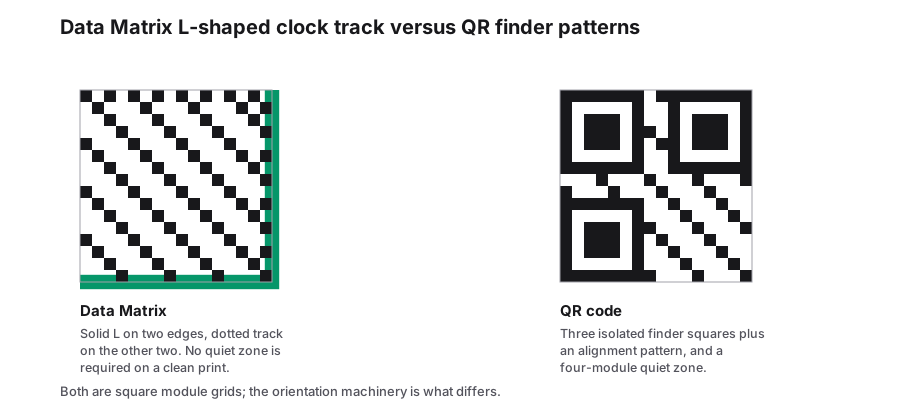
- Very small marking area: Data Matrix or Micro QR. Data Matrix scales down to 10 x 10 modules and is the usual choice for laser or dot-peen direct part marking.
- No room for a margin: Aztec. Its central bullseye means it does not need a quiet zone, which suits phone screens and crowded tickets.
- Wide, short label space or older laser scanners: PDF417. Its stacked rows fit a strip layout and can be read by raster laser scanners as well as imagers.
- Fast inkjet lines on cartons or cans: DotCode, which is built from separate dots rather than touching squares.
- Consumers scanning with phone cameras: a standard QR code is usually the safer choice, since phone camera apps read it reliably.
Printing and marking guidance for any 2D symbol
Module size matters more than overall size. Choose an X-dimension (the size of one cell) that your printer can reproduce cleanly and your scanner can resolve; label printers at 203 dpi need larger modules than 600 dpi printers. Export SVG whenever your layout software accepts vector files, so edges stay sharp at any scale, and avoid resizing PNGs by non-integer amounts.
Keep high contrast, with dark modules on a light background, and respect each format quiet zone: one module for Data Matrix, two for PDF417 and Micro QR, none for Aztec. Before a production run, verify a sample with the same type of scanner used in the field. For regulated labels, grade printed symbols with an ISO/IEC 15415 verifier.
Frequently Asked Questions
What is the difference between a 2D barcode and a QR code?
A QR code is one type of 2D barcode. The term 2D barcode covers every symbology that stores data in a grid or stacked rows, including Data Matrix, Aztec, PDF417, DotCode and Micro QR. Each has its own standard, capacity and typical industry. Standard QR codes are made in the separate PureTools QR generator, which you can reach in one click.
Is the 2D barcode generator free to use?
Yes. There is no sign-up, no watermark and no limit on how many codes you create. The codes are static, so the data is stored in the symbol itself and never expires. The site is supported by ads, but SVG, PNG and PDF exports are available to everyone at no cost.
Is my data uploaded when I make a code?
No. Codes are drawn in your browser with the open-source bwip-js library, so serial numbers, lot codes or other data you enter are not sent to a server for encoding. The website itself shows ads, but the content you encode stays on your device.
Can I generate many 2D barcodes at once?
Yes, for Data Matrix, Aztec and PDF417. Upload an Excel, CSV or Google Sheets file to the Bulk Studio with a Matrix Data column and a Symbology column. You get a ZIP of PNG or SVG files, a results spreadsheet and a printable PDF sheet. DotCode and Micro QR are single-code only.
Can I choose the error correction level?
Not in this studio. Each symbology is generated with its standard default error correction, which suits most labels. Data Matrix ECC 200 uses a fixed level determined by symbol size, while PDF417 and Aztec defaults scale with the amount of data. If your specification demands a particular level, check the result with a verifier.
Related generators
- Data Matrix Code Generator for Parts, Pharma and LabelsEncode serial numbers, URLs and GS1 data in a tiny square that stays readable even when partly damaged. Download vector files for marking and printing.
- PDF417 Barcode Generator for IDs, Tickets and DocumentsCreate the stacked 2D barcode used on driver licenses, boarding passes and shipping documents. It holds long records and can be read by linear imagers.
- DotCode Generator for High-Speed PackagingCreate DotCode symbols designed for the dot printers and laser markers that run on production lines, then export them as SVG or PNG.
- Bulk 2D Barcode Generator from a SpreadsheetOne column of values in, a folder of labelled 2D symbols out. Mix Data Matrix, Aztec, PDF417, Micro QR and DotCode in the same run.