How to use the Bulk QR Codes generator
- 1
Get the template
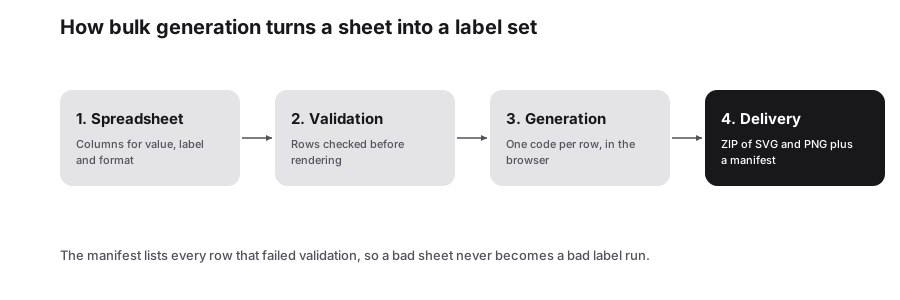
Download the Excel or CSV template, or copy the header row into Google Sheets, then add one row per QR code.
- 2
Upload or paste
Upload your .xlsx, .xls or .csv file, or paste rows directly. Every row is generated and shown in a searchable preview.
- 3
Download everything
Choose PNG or SVG, resolution, colors and labels, then download a ZIP of images, the results spreadsheet or a printable PDF.
Features
- Excel, CSV and Google Sheets templates with set columns
- Upload .xlsx, .xls or .csv, or paste rows directly
- ZIP download of PNG or SVG files named from your labels
- Choose resolution, colors and an optional text label
- Printable PDF sheet and a results spreadsheet
Template columns explained
The QR template uses four columns. The payload is the part that matters most; the others help you organize files and keep a record of what each code is for.
Use unique labels, because they name the files inside the ZIP. A label like table-12 or sku-48213 makes it easy to match each image to its place on a floor plan or product list. Keep payloads clean: trim stray spaces, include https:// on links, and check for duplicates before uploading.
| Column | What to enter | Example |
|---|---|---|
| Payload / URL / Text | The content to encode | https://example.com/table/12 |
| Label / Filename | File name and optional caption | table-12 |
| Content Type | The kind of payload, such as URL or text | URL |
| Notes | Internal notes, not encoded | Patio section |
Who uses bulk QR codes
Making codes one at a time works for a handful. Once you need dozens, a spreadsheet keeps the data in one place, avoids copy-and-paste mistakes and leaves you with a record of exactly what each code contains.
- Restaurants: one code per table, linking to the menu or an ordering page with the table number
- Event organizers: individual codes for tickets, badges, sessions or check-in points
- Retail and warehouses: shelf labels and product tags pointing to spec sheets
- Schools and libraries: codes for classrooms, equipment and collections
- Marketers: separate codes per flyer batch or location, each with its own tracking parameters
Getting a clean print run
For professional print, choose SVG so each code scales without blur, or PNG at 1024 px for documents and label software. The printable PDF sheet lays the codes out for a desktop printer, which is handy for stickers and table cards. Turn on text labels if staff need to tell codes apart at a glance.
Before printing hundreds, scan a few codes from the preview, including the first and last rows, to catch errors in the source data. Keep colors dark on light and save the results spreadsheet with your project files. Because processing happens in your browser, very large batches depend on your device, so split huge lists into a few files if things slow down.
Frequently Asked Questions
How many QR codes can I make at once?
There is no fixed limit and no charge. Because codes are generated in your browser, the practical ceiling depends on your computer's memory and speed. Hundreds of codes are routine; for many thousands, splitting the list into smaller files keeps the page responsive.
Can I use Google Sheets?
Yes. Copy the template header row into a Google Sheet and fill in your rows. Then either download the sheet as CSV or Excel and upload it, or copy the rows and paste them straight into the Bulk Studio. Both routes produce the same results.
Is my spreadsheet uploaded to a server?
No. The file is read and processed in your browser, and the QR codes are generated on your device. Your URLs, product data and notes are not sent to a PureTools server, which makes the Bulk Studio suitable for internal lists you would rather keep in-house.
How are the image files named?
Each image is named from the Label / Filename column, so a row labeled table-12 produces a file you can find instantly. Use unique labels to avoid confusion. You can also download a results spreadsheet that lists every row alongside its generated code for your records.
Will bulk QR codes expire?
No. Every code is static, with its content encoded directly in the pattern. There are no scan limits, and the codes keep working even if PureTools goes away. If a destination may change later, point the codes at pages you control rather than reprinting.
Related generators
- Free QR Code Generator for Links, WiFi, Contacts and MoreTurn any website address into a scannable QR code in seconds, then style it with your colors and logo. The same tool also makes WiFi, contact, email, phone, event, location, UPI payment and SMS codes.
- Create Barcodes in Bulk From Excel or CSVTurn a product or asset list into print-ready barcodes in one pass. Mix symbologies in the same file and download everything as a ZIP or PDF sheet.
- WiFi QR Code Generator for Guest NetworksGuests point their camera at the code and join your network instantly. No more spelling out long passwords at the counter.
- Create a vCard QR Code for Your Business CardScanning opens a ready-to-save contact with your name, number, email and company filled in. No app needed and no typing mistakes.