How to use the Event QR Code generator
- 1
Describe the event
Type the title and set the start. Add an end time if the length matters, because an entry with no end is filed at whatever default your calendar app uses, often one hour.
- 2
Add the venue and the detail
Fill in the location and a description with anything worth having on the calendar entry: a room number, a gate code, who to ask for. Both fields are optional and both arrive inside the event.
- 3
Scan it before you print the batch
Use the phone camera your audience will use, on the preview and then on a printed proof. Confirm the time lands where you expect it, then download SVG for the printer.
Features
- A full iCalendar object written into the code, in the format RFC 5545 describes
- Start and end taken from datetime fields, with the end only written when a start exists
- Venue and notes carried through, with commas, semicolons, backslashes and line breaks escaped
- A unique UID and DTSTAMP on every code, so one card scanned twice does not create two events
- Print-ready SVG and PNG, built in your browser with no sign-up and no watermark
What a calendar QR code actually holds
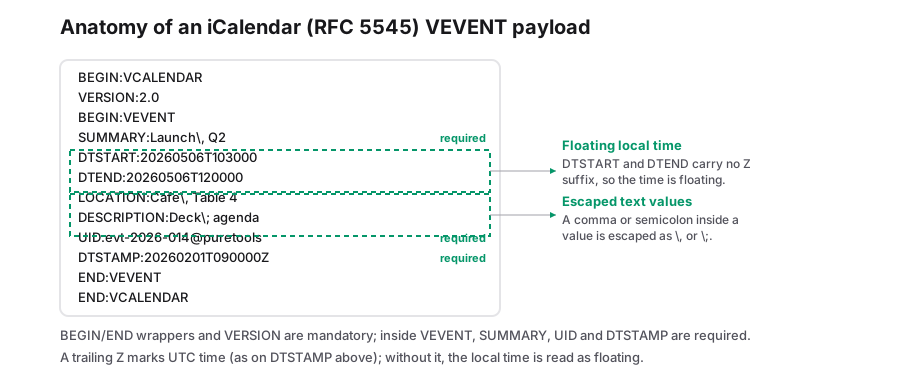
A calendar QR code is ordinary iCalendar text, printed as a pattern instead of attached to an email as an .ics file. The generator wraps what you type in the standard envelope: BEGIN:VCALENDAR and VERSION:2.0 at the top, a PRODID line naming this site, then one BEGIN:VEVENT block holding the event itself, closed by END:VEVENT and END:VCALENDAR. Any phone that recognises iCalendar can read that block and offer to file it.
Inside the VEVENT block, each line maps to one field you filled in. SUMMARY takes the title, DTSTART takes the start, DTEND takes the end, LOCATION takes the venue and DESCRIPTION takes your notes. RFC 5545 requires UID and DTSTAMP on every VEVENT, so both are written for you: the UID is a unique string for that particular code, and DTSTAMP records the moment it was created. Calendar readers use the pair to recognise a duplicate import, which is why a guest who scans the same table card three times still ends up with one event.
One detail is worth knowing before anything goes to print. iCalendar treats a comma and a semicolon as structure rather than as text, so the generator escapes commas, semicolons, backslashes and line breaks in your title, venue and description. A venue written as "Main Hall, 3rd floor; ask for Rao" survives the round trip intact, and a description with real line breaks is stored as escape sequences that the calendar app turns back into separate lines.
| Line in the code | Where it comes from | Behaviour worth knowing |
|---|---|---|
| BEGIN:VCALENDAR, VERSION:2.0, PRODID | Written automatically | The envelope a calendar parser looks for before anything else |
| SUMMARY | Event title field | Required by RFC 5545; an empty field becomes "Untitled event" |
| DTSTART | Start datetime | Left out entirely if the field is empty or not in the expected shape |
| DTEND | End datetime | Only written when a start time is present |
| LOCATION, DESCRIPTION | Venue and notes fields | Optional; the line is omitted if you leave the field blank |
| UID, DTSTAMP | Generated per code | Required by RFC 5545; readers use them to avoid duplicate events |
Floating times: the one thing to get right
Times come from the two datetime fields and are written as floating local time, a value shaped like 20260506T103000 with no trailing Z and no timezone identifier on DTSTART. Under RFC 5545 a floating time is not tied to any zone. The calendar app files it at that clock reading, in the timezone of the phone doing the import.
For most events that is exactly the behaviour you want. A school fete, a clinic appointment or a shop opening printed for people standing in one timezone arrives at 10:30 on every handset, whatever region setting the phone happens to carry. Nothing converts it and nothing drifts, and you never have to decide which zone to name.
It stops being the right answer when your audience is not in one place. A remote talk written as 20260506T103000 lands at 10:30 in Mumbai, 10:30 in London and 10:30 in New York, which is three different real-world moments, and the guests who turn up at the wrong one will blame the invitation rather than the format. For anything remote, write the zone in words into the title or the description, for example "10:30 IST, 05:00 UTC", or hand people a proper .ics file with a timezone reference. A printed event code has no reliable way to carry a zone name that phone camera imports will honour.
What a printed event code cannot do
This tool makes a plain QR of text, and text does not have a conversation. There is no RSVP capture, no attendee list and no way for you to learn that anyone scanned the card. Nobody is notified, nothing is logged, and the code cannot be counted afterwards.
Nor can it update or cancel. RFC 5545 defines a workflow for that, with an organiser sending a method update carrying the same UID as the original, and none of it survives being printed as a still image. Once a guest has filed the event, the only channel left is the one you already have: a message, a phone call, or a fresh card at the door with corrected times. Plan the details before printing, and if the schedule is genuinely still moving, point the code at a page instead.
| If you need to | The printed code will | Better fit |
|---|---|---|
| Know how many people are coming | Tell you nothing; there is no reply path | A registration page encoded as a URL QR code |
| Move the date or the time later | Stay exactly as printed, forever | A link you can edit on your own site |
| Remind attendees automatically | Do nothing after the import | The reminder settings inside each guest entry |
| Run a recurring series | Write one event with one start time | One code per occurrence |
Printing calendar codes well
- Event text is long. A title, a venue and three lines of description push the payload well past a short link, so the pattern gets denser. Give it 3 x 3 cm on a flyer rather than the 2 x 2 cm a bare URL can survive.
- Keep the modules one dark colour on a light ground. Calendar codes are scanned in a queue or at a doorway, and busy backgrounds are where dense codes fail.
- Print the title, date and venue in words next to the code. It is the fallback for anyone whose phone shows the raw iCalendar text instead of an import prompt.
- Test the printed proof with one iPhone and one Android before the run, at the distance a person will actually stand from the sign.
- Keep the SVG. Reordering a batch of table cards a month before the event costs nothing when the artwork is vector.
Frequently Asked Questions
Will it add the event on both iPhone and Android?
Usually. Current iPhone cameras recognise the iCalendar text and offer to add the entry, while on Android the result depends on which camera and calendar apps are installed, and some third-party scanners only display the raw text. That is why the printed invitation should also state the title, date and venue in words, and why one test scan on each platform is worth doing before the run.
Can I change the event after the cards are printed?
No. The code is a static image of the text as it stood when you generated it, and there is no server behind it that could be updated. Correct everything before printing. If the time really might move, encode a link to a page you can edit instead, and accept that guests who already scanned will not see the change either way.
What happens if I leave the end time empty?
The end line is not written at all, so the importing app decides how long the event runs and most default to one hour. Fill both datetime fields for anything where duration matters, such as a half-day clinic, a guided tour or a slot-based open house, otherwise the second hour overlaps whatever else the guest has booked.
Related generators
- Free QR Code Generator for Links, WiFi, Contacts and MoreTurn any website address into a scannable QR code in seconds, then style it with your colors and logo. The same tool also makes WiFi, contact, email, phone, event, location, UPI payment and SMS codes.
- Create a vCard QR Code for Your Business CardScanning opens a ready-to-save contact with your name, number, email and company filled in. No app needed and no typing mistakes.
- URL QR Code GeneratorEncode a web address as a QR code that stays working forever, because the link lives in the pattern itself rather than on a server we control.
- Turn Any Plain Text Into a QR CodeType a message, a code or short instructions and get a QR code that shows the text right on the scanner's screen. No website or connection required.