How to use the EAN-13 generator
- 1
Get your GTIN
Use a product number from your GS1 company prefix. The first digits identify your company, the rest identify the product.
- 2
Enter 12 or 13 digits
Type the first 12 digits and the generator adds the check digit, or paste all 13 and it verifies the check digit for you.
- 3
Download for print
Export SVG or PDF for your packaging designer, or a high-resolution PNG for labels and online listings.
Features
- Automatic check digit when you enter 12 digits
- Validates 13-digit numbers and flags a wrong check digit
- Human-readable digits under the bars, on or off
- Vector SVG and PDF for packaging, high-res PNG for documents
- Generated locally in your browser, with no upload of your GTINs
How an EAN-13 number is structured
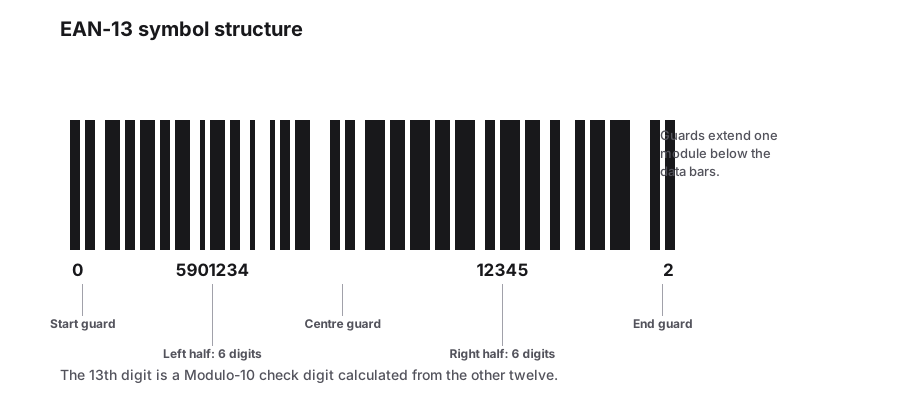
EAN-13 is the barcode used on consumer products sold in shops in most of the world. It encodes a 13-digit GTIN-13. The digits are not random: they are split into a GS1 prefix, your company number, an item reference and a final check digit that protects against misreads and typing errors.
The length of the company number depends on how many products your GS1 licence covers. A company that needs 10 product numbers gets a longer prefix than one that needs 10,000, which leaves fewer digits for the item reference.
| Part | Digits | Meaning |
|---|---|---|
| GS1 prefix | 2-3 | The GS1 member organisation that issued the number, not the country of origin |
| Company number | Varies | Identifies your business within GS1 |
| Item reference | Varies | Identifies a specific product, size or variant |
| Check digit | 1 | Calculated from the first 12 digits with a modulo-10 formula |
How the check digit is calculated
Starting from the left, multiply the digits in odd positions by 1 and the digits in even positions by 3, then add everything together. The check digit is the number you need to add to reach the next multiple of 10. For 590123412345 the weighted sum is 83, so the check digit is 7 and the full number is 5901234123457.
You do not need to do this by hand. Enter 12 digits and PureTools appends the correct check digit automatically. If you enter 13 digits with a wrong final digit, the generator warns you before you print anything.
Printing EAN-13 so it scans at the till
- The nominal size is 37.29 mm wide by 25.93 mm tall. GS1 allows scaling from 80 to 200 percent of that size.
- Do not shorten the bar height (truncation). Many retailers reject truncated barcodes.
- Leave the light margins clear: about 11 modules on the left and 7 on the right.
- Print black or dark blue bars on a white or light background. Avoid red, orange and yellow bars.
- Place the barcode on a flat area of the pack, away from seams, folds and curved edges.
Frequently Asked Questions
Can I make up my own EAN-13 number?
Technically the generator will draw any valid 13-digit number, but retailers and marketplaces check numbers against the GS1 registry. Invented numbers or numbers bought from resellers are often rejected or clash with real products. For anything sold in stores, license a company prefix from your national GS1 organisation.
What is the difference between EAN-13 and UPC-A?
UPC-A is a 12-digit code mainly used in the US and Canada. An EAN-13 that starts with 0 is the same number as a UPC-A with a leading zero added. Modern point-of-sale scanners worldwide read both formats.
Does the first digit mean the country where the product was made?
No. The prefix shows which GS1 member organisation issued the number. A company registered with GS1 Germany can manufacture anywhere and still use a 40-44 prefix.
Which file format should I send to my printer?
Send SVG or PDF. They are vector formats, so the bar edges stay perfectly sharp at any size. Use PNG only for documents and websites, and export it at a high resolution.
Related generators
- UPC-A Barcode Generator for US and Canadian RetailCreate the 12-digit UPC-A barcodes that retailers in North America scan at checkout. The check digit is calculated for you, and you can download print-ready artwork.
- ITF-14 Barcode Generator for Cartons and Outer CasesMake the 14-digit GTIN barcodes printed on corrugated cases and shipping cartons, with the modulo-10 check digit verified before you send artwork.
- Create Barcodes in Bulk From Excel or CSVTurn a product or asset list into print-ready barcodes in one pass. Mix symbologies in the same file and download everything as a ZIP or PDF sheet.
- Create Linear Barcodes Online in Every Common FormatPick a symbology, type your value and download a print-ready barcode in seconds. Code 128, EAN-13, UPC-A, Code 39, Code 93, ITF, MSI, ITF-14, Codabar and Pharmacode are all in one studio.