How to use the Code 93 generator
- 1
Type the value in capitals
Enter the part number, ticket or asset code. Lowercase letters and anything outside the 47-character set are flagged rather than encoded, so correct them before exporting.
- 2
Fit it to the label
Nudge the bar width and height until the symbol suits the space you have. Code 93 is narrower than Code 39 but wider than Code 128, so check it against a real label.
- 3
Export and scan-test
Download SVG or PDF for the label template, or PNG for documents. Scan the printed result with the handheld you actually deploy, with Code 93 enabled in its settings.
Features
- Accepts 0-9, A-Z, the space and the six symbols - . $ / + %
- Both modulo-47 check characters calculated and appended automatically
- Bar width, height and colours adjusted while you type
- Human-readable line under the bars, shown or hidden as you prefer
- SVG, PNG or PDF saved locally, with no sign-up and no watermark
A tighter, self-checking step up from Code 39
Code 93 was designed as the denser, self-checking successor to Code 39, and it still sits between Code 39 and Code 128 on width. Each character occupies nine modules spread over three bars and three spaces, with a narrow gap between neighbours. That is fewer elements per character than Code 39 spends, so the same ticket number prints shorter while remaining readable by any scanner that has the symbology switched on.
The other half of the design is the checksum. Two check characters are added to every symbol: the C character, computed over the data with weights counting down from 20 to 2, then the K character, computed over the data plus C with weights counting down from 15 to 1. Both are taken modulo 47. This generator appends them without being asked and offers no switch to suppress them, which is deliberate: a truncated print or a dropped bar then fails the checksum instead of quietly handing your system a wrong number.
The trade-off is that Code 93 is not a GS1-registered symbology. There is no company prefix behind it and no catalogue that recognises it, so it belongs where one organisation controls both the label and the reader - stock rooms, library items, work-in-progress tickets, logistics sub-labels - rather than on products that scan at a till.
What the 47-character set lets you type
The Code 93 code table holds 47 values: ten digits, twenty-six uppercase letters, the space, and the six symbols - . $ / + %. This page accepts exactly those and nothing else. Lowercase letters, accented characters and punctuation such as commas, brackets or underscores produce an error rather than being silently remapped, so capitalise a value before you paste it.
The standard does reach further than 47 characters, using four shift symbols that encode an outside character as a pair; the table exists in the code we bundle, but the shift path is not exposed here. For mixed case or arbitrary ASCII, Code 128 is the simpler answer.
| Input | What this page does |
|---|---|
| 0-9, A-Z, space, - . $ / + % | Encodes it as typed |
| a-z | Rejects it; capitalise the value first |
| Other punctuation, accents, control characters | Rejects it and shows an error |
| Mixed case such as "part-94820-a" | Rejects it; the format has no lowercase |
How the symbol is laid out
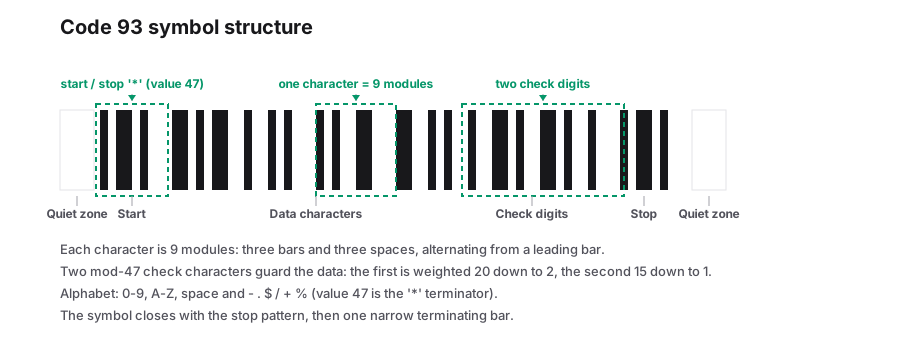
Every element in the symbol is a multiple of one narrow measurement, so the bar width control scales the whole code instead of only the bars. The symbol opens with a start pattern, carries your characters and the two check characters, then closes with a stop pattern and a final terminating bar. Because the check characters are derived from your data, they cannot disagree with it - only with a bad print.
One detail saves people confusion at sign-off: the line printed under the bars mirrors what you typed, while the bars themselves carry your data plus the two check characters. A scanner verifies those internally and normally strips them before the value reaches an application, so if the scanned output ends in two odd extra characters, the setting to change is on the reader.
| Property | Detail |
|---|---|
| Modules per character | Nine, across three bars and three spaces |
| Values in the table | 47: digits, A-Z, space, - . $ / + % |
| Check characters | Two, modulo 47, C first then K, always added |
| Lowercase and full ASCII | Not available on this page |
| Start, stop and terminator | Handled by the format; you do not type them |
| Text under the bars | Optional, follows your typed value |
Print and scan checks before the first run
The narrowest element in the symbol is the X-dimension, and everything else is built from multiples of it. Pick it from the room on the label and the printer you have, then change the bar width here rather than resizing a finished PNG, because scaling a bitmap softens the edges and eats into the clear space at both ends at the same time.
- Leave unprinted clear space at each end of the symbol; most internal specifications ask for around ten narrow-element widths, and the margin control adds plain background that counts towards it.
- Confirm the reader is enabled for Code 93 and for a data length that includes your value plus the two check characters.
- Print at the final size and scan that print - a screen preview flatters narrow bars.
- Keep the human-readable line so staff can key the value if the bars are damaged.
- If the identifier has to mean something outside your own organisation, use a format with registered meaning instead; Code 93 carries none.
Frequently Asked Questions
Why is my lowercase text refused?
Code 93 has no lowercase in its 47-value table, and this generator will not shift-encode it for you. Capitalise the value, or move to Code 128 if the data genuinely has to keep its case.
Can I turn the check characters off?
No. The pair of modulo-47 check characters is always appended and there is no override on this page. They are what makes the format self-checking, and readers normally strip them after verifying the sum.
Is Code 93 a GS1 code?
It is not a GS1-registered symbology, so there is nothing to register and it cannot stand in for EAN-13 or UPC-A on retail packaging. It suits internal identifiers, library items, sub-labels and any label where you also set the scanner.
Should I just use Code 128 instead?
If your system does not specifically require Code 93, Code 128 is the usual choice: it is denser and handles full ASCII. Code 93 is worth keeping where an existing installation expects it and you want a stricter, easier-to-verify numeric-and-uppercase scheme.
Related generators
- Code 39 Barcode Generator for Badges, Parts and AssetsCreate Code 39 (Code 3 of 9) barcodes, the self-checking format still required by many automotive, defense and access control systems.
- Code 128 Barcode Generator for Labels and InventoryThe most versatile linear barcode. Encode SKUs, serial numbers and tracking IDs with letters, digits and punctuation, then download sharp label artwork.
- Create Barcodes in Bulk From Excel or CSVTurn a product or asset list into print-ready barcodes in one pass. Mix symbologies in the same file and download everything as a ZIP or PDF sheet.
- Create Linear Barcodes Online in Every Common FormatPick a symbology, type your value and download a print-ready barcode in seconds. Code 128, EAN-13, UPC-A, Code 39, Code 93, ITF, MSI, ITF-14, Codabar and Pharmacode are all in one studio.