How to use the UPI Payment QR Code generator
- 1
Enter your UPI handle and the name customers should see
Type the payee VPA exactly as your bank issued it, in the form name@bank, and the shop or business name that will appear on the payer confirmation screen. Match the name to what your statement shows, so a customer can recognise the debit later.
- 2
Decide whether the amount is fixed
Fill the amount for a set-price item, so the payer only confirms. Leave it blank for general trade, and accept that the customer types the figure and can type it wrong.
- 3
Test it with a rupee before it goes on the counter
Pay the code one rupee from another UPI account, check the credit reaches the account behind that handle, then reverse it. Scan the printed proof at arm length with a phone that is not yours.
Features
- Writes the NPCI NPAPI payment link, upi://pay, that merchant-presented UPI codes use
- Payee ID and payee name as the two core parameters, plus optional amount, note and reference
- Every value percent-encoded, and any optional parameter you left blank is dropped rather than sent empty
- Currency pinned to INR, so a payer cannot switch it at the confirmation screen
- Made in your browser, so your UPI handle and price list are not uploaded to a server
The payment link, parameter by parameter
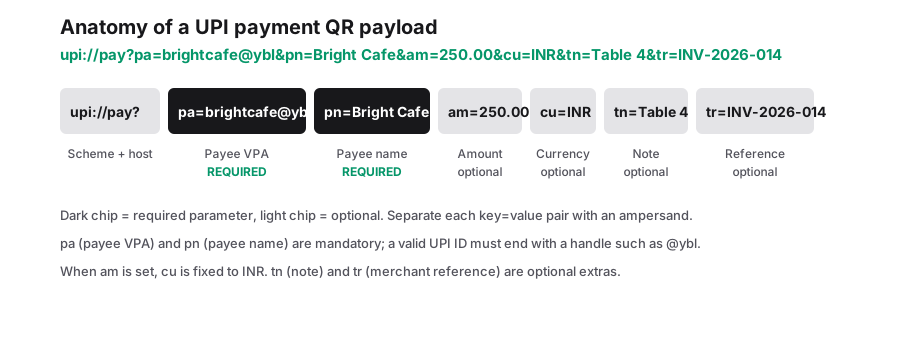
UPI runs on the rails NPCI operates, and the merchant-presented static code is a payment link in the NPAPI shape: upi://pay followed by parameters joined with ampersands. Your UPI handle is the pa parameter and says whose account the money goes to. The payee name, pn, is the label the payer app shows before anyone authorises anything. Those two are the required pair, and the remaining parameters are optional: am for the amount in rupees, cu for the currency, tn for the note the payer can see and sometimes edit, and tr for a transaction reference that rides along to the bank statement line.
Two details of how this tool assembles that link matter once you start relying on it. The first is that cu is always written as INR, so this is a rupee collection instrument and nothing else. The second is that an optional parameter you left empty is omitted outright instead of being sent as a blank value, which keeps the payload short and stops a payer app from displaying an empty note field.
Every value you type is percent-encoded before it goes in. A shop name with a space, an ampersand or a comma in it would otherwise break the link, because those characters are the delimiters of the format. Encoding turns them into plain data, so "Rao and Sons" arrives as one payee name rather than as a name plus a stray parameter.
| Parameter | What it controls | If you leave it blank |
|---|---|---|
| pa | Your payee VPA, the account the money lands in | The link has no destination, and nobody can pay you |
| pn | Payee name shown on the payer confirmation screen | The app shows a generic or unnamed payee, which people hesitate to approve |
| am | Rupee amount, pre-filled in the payer app | The payer types the amount themselves |
| cu | Currency. Always written as INR by this tool | Not applicable; the parameter is always present |
| tn | Transaction note describing the purchase | The UPI app supplies its own default note |
| tr | Reference string carried through to the statement | Nothing ties a later credit to a particular order |
A static code is not a payment gateway
This part needs saying plainly, because plenty of counters run on a printed UPI square and treat the buzz of a phone as proof of payment. A static QR is a request. When the payer app reports success, that is the payer side of the transfer, and nothing comes back to this code, to this site or to you. There is no payment confirmation, no callback, no webhook, no notification and no reconciliation. The only way to learn whether the money arrived is to look at your own bank statement or your PSP dashboard, on whatever schedule you check them.
Two consequences follow at the counter. First, a screen turned towards you is suggestive rather than conclusive: ask the payer to confirm the amount and your payee name are visible on that screen, and if you are releasing goods on trust or on credit, check your account before the customer leaves. Second, a day of credits with no names attached is not bookkeeping. If you need to match money to orders, put something identifiable in the reference parameter per order, and make a new code per order, or accept that you will be squinting at a list of identical rupee amounts at closing time.
| Question you want answered | What a printed static code answers it with |
|---|---|
| Has this customer paid? | Nothing. Check your statement or PSP app |
| Which order does this credit belong to? | Only if you pre-filled tr with an order reference when the code was made |
| Did the payer enter the wrong amount? | Silence, until you read the statement |
| Can I withdraw a code that is already on the counter? | No. Reprint, and remove the old copies |
| How many people scanned my code? | Not recorded anywhere. The pattern is inert ink |
Fixed amount, or let the payer type it
Leaving the amount empty is the simplest single-code setup: one printed square serves the whole shop, and the customer enters the total. It is also the least reliable. People mistype, they round down when the figure has paise in it, and a busy queue makes both mistakes more likely.
Pre-filling removes the decision entirely. The payer opens the code, sees the sum, and authenticates. The number cannot be wrong, which is why fixed-price items, tickets, deposits and set meals are worth a code each. The cost is that the amount is baked into the print: a new price list means new artwork, so keep each design as an SVG and reprint the whole sheet at once rather than patching one square on the counter and confusing everyone.
A middle path is to pre-fill the amount only where the price is genuinely fixed, and keep one unpriced code for general trade. Label the two squares differently in words, so a customer at a mixed till knows which one to use.
Before a printed code becomes your main till
- Above a small annual-turnover threshold, Indian merchant guidance requires dynamic QR codes with the amount pre-filled rather than one static print used for every sale. The threshold and the wording move, so check the current NPCI and RBI guidance for your turnover band with your bank or PSP before a static code carries all of your trade.
- Pay your own code a rupee and confirm which account the credit landed in. A mistyped handle sends money somewhere else, and recovery is slow.
- Do not lay a logo over the middle of a payment code or tint it. Payers hold the phone at arm length in a queue, and the pattern has to survive one scan, first time.
- Print the payee name in words under the code as well, so a payer who checks the confirmation screen can match it to your sign and is less likely to bail.
- Keep the code free of anything that identifies an account number or a personal handle you use for peer transfers. The VPA on a counter is the one you are happy to receive on.
Frequently Asked Questions
Will the code work in every UPI app?
The upi://pay link is the standard merchant-presented form, and the mainstream apps handle it, including BHIM, Google Pay, PhonePe, Paytm and the bank apps. What decides success is whether your handle resolves to a live account, so the one-rupee test from a different app is worth doing before you print a run.
Do I need a payment gateway or a merchant account for this?
No. This is the static QR route: the payer app does the work and money moves between UPI accounts straight to your handle. What you give up in exchange is the confirmation side of a gateway, so cards, refunds through a dashboard and automatic payment receipts are not part of it.
Can I change the amount or the payee name without reprinting?
No. Both are written into the pattern itself, and there is no redirect behind the code that could be switched. A new price or a new handle means generating a fresh code and physically replacing the old one, which is the main operational cost of a static payment code.
Related generators
- Free QR Code Generator for Links, WiFi, Contacts and MoreTurn any website address into a scannable QR code in seconds, then style it with your colors and logo. The same tool also makes WiFi, contact, email, phone, event, location, UPI payment and SMS codes.
- Create QR Codes in Bulk From a SpreadsheetFill in a template, upload it, and get every QR code named and ready to print. Everything runs in your browser.
- URL QR Code GeneratorEncode a web address as a QR code that stays working forever, because the link lives in the pattern itself rather than on a server we control.
- Turn Any Plain Text Into a QR CodeType a message, a code or short instructions and get a QR code that shows the text right on the scanner's screen. No website or connection required.