How to use the WiFi QR Code generator
- 1
Enter network details
Type the network name (SSID) exactly as it appears, including capitals and spaces, then enter the password.
- 2
Choose the security type
Select WPA for most modern routers, WEP for older equipment, or None for an open network. Tick Hidden if the SSID is not broadcast.
- 3
Test, then print
Scan the preview with a phone that is not already connected to confirm it joins, then download and print the code.
Features
- One-scan joining from modern iPhone and Android cameras
- WPA/WPA2, WEP and open (no password) networks
- Hidden network option for SSIDs that are not broadcast
- Password stays in your browser; nothing is uploaded
- Print-ready SVG and PDF for table tents and door signs
How a WiFi QR code works
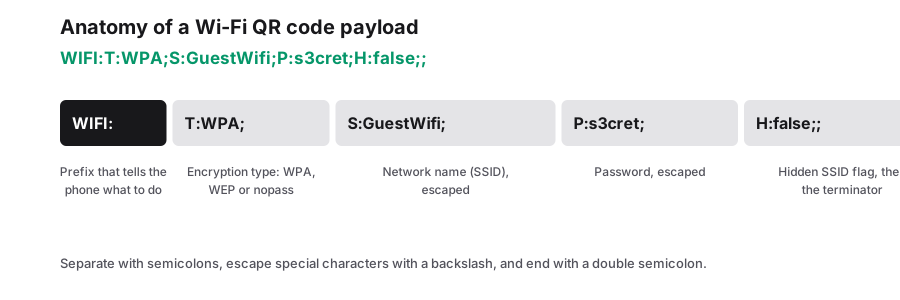
A WiFi QR code stores your network details in a standard text format that phone cameras recognize. The payload looks like WIFI:T:WPA;S:CafeGuest;P:sunflower42;; where T is the security type, S is the network name and P is the password. A hidden network adds H:true. When the camera reads this string, the phone shows a 'Join network' prompt instead of opening a web page.
Special characters such as semicolons, commas, colons and backslashes in the name or password are escaped with a backslash so they are not mistaken for separators. The generator handles this for you, but it is still worth testing networks with unusual passwords. Because the code is static, it contains the password itself; if you change the password, you need a new code.
Where WiFi QR codes save time
- Cafes and restaurants: a table tent or menu insert replaces the password printed on the receipt.
- Hotels and holiday rentals: a framed card in the room answers the most common guest question.
- Offices and coworking spaces: a sign in reception for the visitor network.
- Events and conferences: print the code on badges, lanyards or the agenda.
- At home: a fridge magnet for visiting family, so nobody reads a sticker off the router.
Keeping your network secure
Anyone who can photograph the code can join the network, so treat it like the password itself. Put the code on a separate guest network rather than the one your card terminals, cameras or office computers use. Most routers let you create a guest SSID with client isolation in a few clicks, which keeps visitors away from your internal devices.
Rotate the guest password every few months, or after a busy season, and print a fresh code when you do. Because codes are generated locally in your browser, the password you type is never sent to PureTools, which matters when you are encoding credentials. Avoid posting the code publicly online unless the network is meant to be open to everyone.
Frequently Asked Questions
Do iPhones and Android phones scan WiFi QR codes?
Yes. Recent iPhones and most current Android phones read WiFi QR codes straight from the built-in camera app, while some older Android models need Google Lens or a scanner app. The phone shows a prompt to join the network, and the guest taps once to connect.
What if my network name has spaces or symbols?
That is fine. Enter the SSID exactly as it appears, including spaces, capital letters and symbols. Characters that have special meaning in the WIFI: format, such as semicolons and colons, are escaped automatically. Network names are case-sensitive, so 'CafeGuest' and 'cafeguest' are treated as different networks.
Which security type should I choose?
Pick WPA for nearly every modern router; it covers WPA and WPA2 networks, which is what most homes and businesses use. Choose WEP only for very old equipment, and None for open networks with no password. If you are unsure, check your router's admin page or the label on the device.
Do I need a new code if I change the WiFi password?
Yes. The password is stored inside the static code, so the old code will stop connecting once the password changes. Generate a new code with the updated password and replace the printed copies. Keeping an SVG of your design makes reprinting quick.
Is it safe to type my WiFi password here?
The code is created in your browser with JavaScript, and the password you enter is not uploaded to our servers. That said, the printed code reveals the password to anyone who scans it, so use it for a guest network rather than your main business network.
Related generators
- Free QR Code Generator for Links, WiFi, Contacts and MoreTurn any website address into a scannable QR code in seconds, then style it with your colors and logo. The same tool also makes WiFi, contact, email, phone, event, location, UPI payment and SMS codes.
- Turn Any Plain Text Into a QR CodeType a message, a code or short instructions and get a QR code that shows the text right on the scanner's screen. No website or connection required.
- Create a vCard QR Code for Your Business CardScanning opens a ready-to-save contact with your name, number, email and company filled in. No app needed and no typing mistakes.
- Create QR Codes in Bulk From a SpreadsheetFill in a template, upload it, and get every QR code named and ready to print. Everything runs in your browser.