How to use the Code 128 generator
- 1
Enter your value
Type a SKU, asset tag, order number or tracking ID. Letters, digits, spaces and symbols are all allowed.
- 2
Size it for your label
Lower the bar width to fit narrow labels, and raise the height for hand-held scanning. Keep the human-readable text on if people need to read it.
- 3
Print or download
Print directly or export SVG or PDF for label design software. Use the Bulk Studio when you have hundreds of codes.
Features
- Full ASCII support: upper and lower case, digits, punctuation
- Automatic code set switching for the shortest possible barcode
- Adjustable bar width, height, font size and margins
- SVG, PNG and PDF export, plus direct printing to label printers
- Bulk mode turns a spreadsheet of SKUs into a ZIP of barcodes
Why Code 128 is the default choice
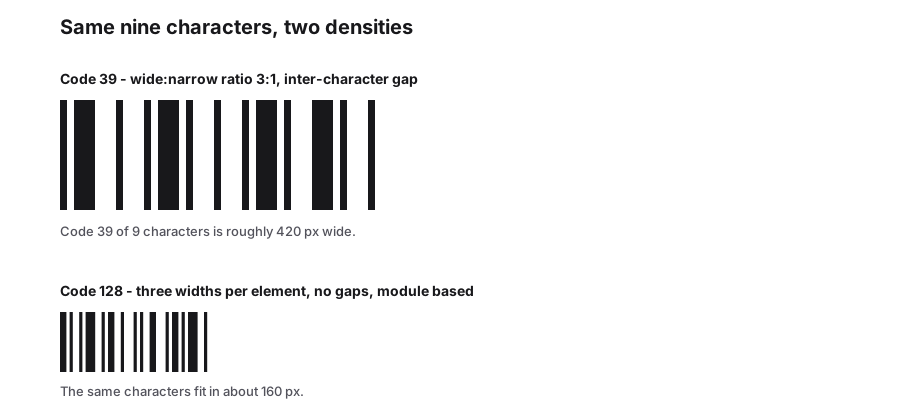
Code 128 can encode all 128 ASCII characters and is much denser than older formats like Code 39. That means a shorter barcode for the same data, which matters on small labels. It also includes a mandatory checksum, so a damaged or misread barcode is rejected instead of returning the wrong value.
It is the basis of GS1-128, the format used on logistics labels for batch numbers, expiry dates and serial shipping container codes. Almost every scanner made in the last 25 years reads it without configuration.
Code sets A, B and C
Code 128 has three character sets, and the encoder can switch between them in the middle of a barcode. You do not need to choose one; the generator picks the most compact combination automatically.
| Code set | Characters | Best for |
|---|---|---|
| A | Upper case, digits, control characters | Legacy systems that use control codes |
| B | Upper and lower case, digits, punctuation | Most text such as SKUs and names |
| C | Digit pairs 00-99 | Long numbers; packs two digits per symbol |
Tips for reliable Code 128 labels
- Long numeric values are shorter in Code 128 than in any other common 1D format, thanks to code set C.
- Keep a quiet zone of at least 10 times the narrowest bar on each side.
- For thermal printers, use a bar width that is a whole number of printer dots to avoid uneven bars.
- If a value is too long for your label, consider a Data Matrix or QR code instead.
Frequently Asked Questions
Is Code 128 the same as GS1-128?
GS1-128 is Code 128 with a special FNC1 start character and data organised into GS1 application identifiers, such as (01) for GTIN or (17) for expiry date. Plain Code 128, which this tool creates, is the right choice for internal labels.
How long can a Code 128 barcode be?
The specification has no hard limit, but practical scanners struggle beyond about 40 to 50 characters, and the barcode becomes very wide. For long data, use a 2D code.
Can Code 128 encode lower-case letters?
Yes. Code set B covers upper and lower case letters, digits and common punctuation, unlike Code 39, which is upper case only.
Can I use Code 128 on retail products?
Not at the checkout. Point-of-sale systems expect EAN-13 or UPC-A. Use Code 128 for internal stock, shipping and asset labels.
Related generators
- Create Barcodes in Bulk From Excel or CSVTurn a product or asset list into print-ready barcodes in one pass. Mix symbologies in the same file and download everything as a ZIP or PDF sheet.
- Code 39 Barcode Generator for Badges, Parts and AssetsCreate Code 39 (Code 3 of 9) barcodes, the self-checking format still required by many automotive, defense and access control systems.
- Data Matrix Code Generator for Parts, Pharma and LabelsEncode serial numbers, URLs and GS1 data in a tiny square that stays readable even when partly damaged. Download vector files for marking and printing.
- Create Linear Barcodes Online in Every Common FormatPick a symbology, type your value and download a print-ready barcode in seconds. Code 128, EAN-13, UPC-A, Code 39, Code 93, ITF, MSI, ITF-14, Codabar and Pharmacode are all in one studio.