How to use the QR Code Generator generator
- 1
Enter your link
Paste the full website address, including https://. Switch the content type if you need WiFi, a contact card, email, phone or plain text instead.
- 2
Style the code
Pick colors, module and eye shapes, or a quick theme preset. Add a logo if you like; error correction is raised automatically so the code still scans.
- 3
Test and download
Scan the preview with your phone, then download SVG for print or PNG for screens. Press Ctrl/Cmd+S to download instantly.
Features
- Static QR codes that never expire and have no scan limits
- Ten content types: URL, text, WiFi, vCard, email, phone, event, location, UPI and SMS
- Custom colors, module shapes, eye styles and center logos
- Export SVG, high-res PNG or PDF, or copy to clipboard
- Generated in your browser; your content is not uploaded
Static QR codes: what that means for you
Every QR code made here is static. The website address is written directly into the black-and-white pattern, so a phone reads it without contacting any PureTools server. There is no account to keep active, no subscription that lapses and no redirect that can be switched off. A code printed on a menu or a shop window today will still open the same page years from now, as long as the destination itself stays online.
The trade-off is that a static code cannot be edited after printing. If you expect the destination to change, point the code at a stable page on your own domain and update that page instead of reprinting. Keep the URL short where you can: fewer characters produce a less dense pattern that scans faster and from farther away.
Picking the right content type
The URL type is the most common, but the same generator handles nine other formats. Each one tells the scanning phone to do something different, so choose the type that matches what you want people to do next.
| Content type | What the phone does | Typical use |
|---|---|---|
| URL | Opens the link in the browser | Menus, flyers, product pages |
| WiFi | Offers to join the network | Cafes, guest rooms, offices |
| vCard | Saves a new contact | Business cards, name badges |
| Opens a pre-filled message | Support requests, feedback | |
| Phone | Opens the dialer with the number | Service vans, posters |
| Event | Adds the appointment to the calendar | Invitations, talks, open houses |
| Location | Searches the place in the maps app | Market stalls, directions signs |
| UPI | Opens the payment app with the amount | Counters, tables, place-of-worship donations |
| SMS | Opens a text with the body filled in | Feedback, order codes, contactless callbacks |
| Text | Shows the text on screen | Serial numbers, short notes |
Print and design tips that keep codes scannable
- Print at least 2 x 2 cm (about 0.8 in). For codes scanned from a distance, make the code roughly one tenth of the scanning distance wide.
- Keep strong contrast: a dark foreground on a light background. Pale or inverted color pairs fail on many phone cameras.
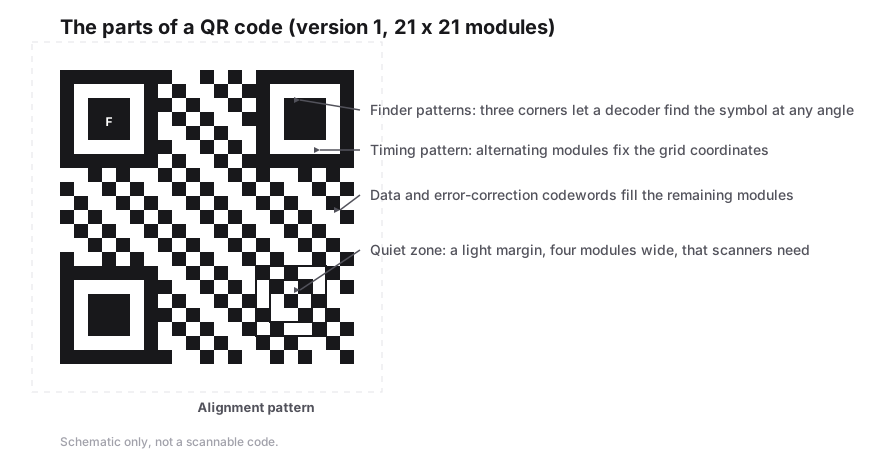
- Leave the quiet zone (the blank margin) intact, and do not let text or borders touch the code.
- Use error correction M for plain codes, and Q or H when adding a logo or printing on rough or curved surfaces.
- Send SVG files to print shops and for large formats; vector output stays sharp at any size.
- Test the final printed proof with two different phones before a full print run.
Frequently Asked Questions
Is this QR code generator really free?
Yes. There is no sign-up, no watermark, no paid tier for downloads and no limit on how many times your codes are scanned. The site is supported by ads, but every export format, including SVG, PNG and PDF, is available to everyone at no cost.
Will my QR code stop working?
No. Codes are static, meaning the link is encoded in the pattern itself rather than routed through our servers. They keep working even if PureTools shuts down. The only thing that can break a static code is the destination website going offline or changing its address.
Can I add my logo to the QR code?
Yes. Choose one of the preset icons or upload your own image to place in the center. When a logo is added, error correction is raised to at least level Q so the covered modules can be recovered. Keep the logo modest in size and test the code before printing.
Which file format should I download?
Use SVG for printing, signage and anything that may be resized, since it is vector and never pixelates. Use PNG for websites, social posts and documents. PDF is handy for sending to a printer or attaching to emails. You can also copy the image straight to your clipboard.
Is the content I enter sent to a server?
No. The QR code is generated in your browser with JavaScript, so the links, passwords or contact details you type are not uploaded. The website itself shows ads, but the content you encode stays on your device.
Related generators
- URL QR Code GeneratorEncode a web address as a QR code that stays working forever, because the link lives in the pattern itself rather than on a server we control.
- WiFi QR Code Generator for Guest NetworksGuests point their camera at the code and join your network instantly. No more spelling out long passwords at the counter.
- Create a vCard QR Code for Your Business CardScanning opens a ready-to-save contact with your name, number, email and company filled in. No app needed and no typing mistakes.
- Event QR Code Generator for Invitations, Talks and Open DaysDescribe the event once and the code carries all of it: summary, start and end time, venue and notes. Your guests scan it and the calendar entry is already written.
- Location QR Code Generator for Addresses and Map PinsType an address or paste coordinates, and the code opens that exact spot in Google Maps when scanned, on iPhone and Android alike.
- UPI Payment QR Code Generator for Shops, Stalls and CountersTurn your UPI handle into a merchant-presented payment code that any UPI app can read, with the amount fixed or left for the payer to type.
- SMS QR Code Generator for Text-to-Order and Text-to-EnquireOne scan opens a draft message: your number in the address line, your text in the body, waiting for the send key.
- Create QR Codes in Bulk From a SpreadsheetFill in a template, upload it, and get every QR code named and ready to print. Everything runs in your browser.