How to Print Barcodes That Scan the First Time
Most scan failures are printing failures. Getting bar width, contrast, material and quiet zone right matters more than which symbology you chose, and it is all decided before you hit print.
By PureTools Editorial TeamUpdated 7 min read
Start with the X-dimension, not the logo
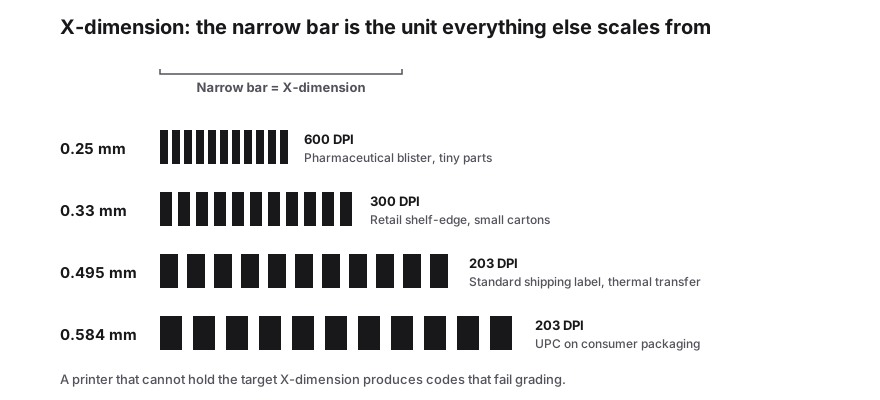
The X-dimension is the width of the narrowest bar, and it controls everything else. A retail EAN-13 on a small consumer pack typically needs at least 0.495 mm, while a shipping label a forklift driver scans from a metre away is often printed at 0.6 to 0.7 mm or larger.
Calculate the symbol from the X-dimension and let the overall width follow. Squeezing a finished barcode image into a smaller box compresses the bars unevenly and is the single most common cause of a label that will not read.
Match resolution to bar width
A 203 dpi printer physically cannot render a 0.2 mm bar cleanly. Either lower the data density, increase the label size or move to a 300/600 dpi device.
| Printer | Typical DPI | Practical narrowest bar |
|---|---|---|
| Desktop thermal | 203 dpi | About 0.125 mm per dot, so keep bars 3-4 dots or wider |
| Industrial thermal | 300 dpi | Comfortable for small retail symbols |
| High-resolution thermal | 600 dpi | Needed for very small X-dimensions and dense Data Matrix |
| Inkjet on cardboard | Varies | Expect dot spread; use larger bars and test |
| Laser / office printer | 600-1200 dpi | Fine for proofs, not for high-volume label runs |
Choose the material and ribbon together
- Direct thermal: cheap, no ribbon, fades in heat and sunlight. Good for short-life shipping labels.
- Thermal transfer with wax ribbon: paper labels, general warehouse use.
- Thermal transfer with wax-resin or resin ribbon: synthetic polypropylene, polyester and polyamide for outdoor, chemical and cold-chain exposure.
- Kraft and recycled cardboards absorb ink and lower contrast; increase bar width when printing on them.
- Glossy laminates create specular glare, which blinds many readers; matte finishes scan more reliably under warehouse lighting.
Geometry rules that are easy to break
- Keep the quiet zone clear: at least 10 times the narrow bar width on each side, and more if a human has to aim.
- Do not print bars edge-to-edge across a fold, a seam or a wrap-around corner.
- Maintain a 2:1 to 3:1 wide-to-narrow ratio for 1D codes. If bars look blobby, the printhead is worn or the heat is too high.
- Print bars vertically on a carton so a hand scanner passes across them horizontally, matching the intended scan direction.
- On curved surfaces such as bottles, place the code where the label lies flat, or widen the bars to absorb distortion.
Printhead care
Vertical light streaks in a printed symbol are printhead damage or dirt, not a data problem. Clean the head at every ribbon change on demanding jobs, replace it when streaks persist, and check platen pressure if bars print thin in one column.
Calibrate print darkness for each new material. Too light gives weak contrast; too dark spreads edges and fuses adjacent bars.
Verify before you run thousands
- Print a test batch on the real label stock with the real printer.
- Scan with the actual devices used in the workflow, including the oldest reader on the floor.
- Check from the real distance and angle, through any packaging film that will sit over the code.
- For retail and logistics work, run a verifier pass on the first article and keep the report.
- Save the artwork as vector, never as a screenshot or a resized PNG, so reprints are identical.
Frequently Asked Questions
Why does my barcode scan on one printer and not another?
Different DPI, print darkness and ribbon-material combinations change the effective bar edges. Reprint and verify on each device rather than assuming the data is at fault.
Can I use an office laser printer for product labels?
For small internal runs, yes, if the paper is smooth and white and the symbol is generated as vector artwork. For retail packaging or high-volume fulfilment, a thermal label printer gives more consistent edges.
How small can a barcode be printed?
It depends on the symbology and the reader. As a rule, keep 1D retail symbols at 0.495 mm X-dimension or larger, and shrink 2D codes only when you can verify them at the final size with the actual scanner.
My printed code looks fine but will not scan. What now?
Check contrast first, then the quiet zone, then whether the image was rescaled non-uniformly. Streaks mean a dirty or damaged printhead. Finally, confirm the scanner is enabled for that symbology.
Sources & further reading
About the author — PureTools Editorial Team
Reviewed against GS1 and ISO symbology specs
Barcode and 2D code pages are reviewed against the GS1 General Specifications and the ISO/IEC bar code symbol standards, then re-checked when a specification is revised.
Editorial policy and corrections