QR Code Best Practices: Design Codes People Actually Scan
A good QR code is high contrast, has a clear margin, sits next to a call to action and leads to a fast, mobile-friendly page. This checklist covers design, content, placement, testing and safety.
By PureTools Editorial TeamUpdated 7 min read
Design: keep it scannable
- Use strong contrast: a dark foreground on a light background. Aim for at least a 4:1 contrast ratio.
- Avoid inverted codes (light on dark). Many older scanners and some apps cannot read them.
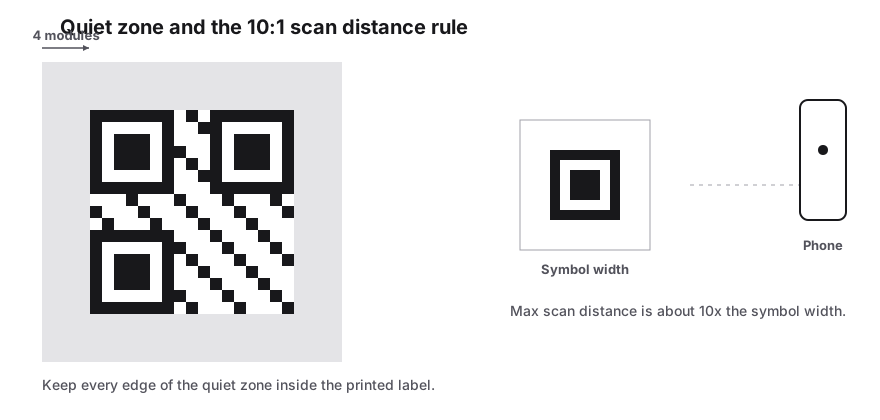
- Keep a quiet zone of at least 4 modules on every side. Do not let text or graphics touch the code.
- Custom shapes such as dots and rounded corners are fine, but keep the three finder patterns clearly visible.
- If you add a logo, raise error correction to Q or H and keep the logo to about 20 percent of the code area.
- Never stretch the code. Scale it evenly, and export SVG for print.
Content: keep it short
Every extra character makes the code denser and harder to scan at small sizes. Use the shortest URL you can, point at a clean landing page path instead of a long parameter-heavy one, and drop tracking parameters you do not need. For contact cards, include only the fields people actually need.
Add UTM parameters if you want to measure results, for example ?utm_source=qr&utm_medium=poster&utm_campaign=autumn. They let you see QR traffic separately in your analytics tool without depending on a third-party redirect.
Tell people why to scan
A bare QR code gets far fewer scans than one with a clear call to action. Put a short, specific instruction right next to the code that says what people get: "Scan to see the menu", "Scan for 10% off", "Scan to join the Wi-Fi". If the code opens a website, showing the short URL as text also gives people a way in when they cannot scan.
Placement and size
| Do | Avoid |
|---|---|
| Place codes at eye or hand level | Placing codes high on walls or at floor level |
| Use flat, matte surfaces | Curved bottles, glossy laminate with glare |
| Size for the scan distance (about 1:10) | Tiny codes on posters seen from afar |
| Place codes where there is mobile signal | Underground or in-flight placements for web links |
| Leave space for the person to stand still | Moving vehicles and busy walkways |
The landing page matters as much as the code
- Everyone who scans is on a phone, so the destination page must be mobile-friendly and fast.
- Send people straight to the relevant content, not your home page.
- Avoid pages that force an app download or a login before showing anything.
- Use HTTPS. Phones and browsers may warn people about non-secure pages.
Test before you print
Scan the final artwork with at least two different phones (iOS and Android) and one third-party app, at the real size and distance. Test in the lighting where the code will be used. Check that the destination is correct and that it loads quickly on mobile data, not just office Wi-Fi.
Security and trust
Fraudsters sometimes stick fake QR codes over real ones on parking meters and posters to send people to phishing sites. Protect your codes with tamper-evident printing where it matters, check public placements regularly, and point to a recognisable domain so people can see where the link goes before they open it.
Static codes are also safer for your business over time. Because they do not depend on a third-party redirect, they cannot be broken or hijacked if a generator service shuts down or changes its terms.
Frequently Asked Questions
Can I change the colors of my QR code?
Yes, as long as the foreground stays dark and the background light with strong contrast. Very light foregrounds, low-contrast pairs and inverted designs reduce scan reliability.
Does adding a logo break the QR code?
Not if you use a higher error correction level (Q or H) and keep the logo small, around 20 percent of the area. Always test the final design with several phones.
What should the call to action say?
State the benefit and the action in a few words, such as "Scan to order" or "Scan for the full specs". Specific wording performs better than a generic "Scan me".
How do I measure how many people scan my code?
Add UTM parameters to the URL and track visits in your analytics. This works with static codes and keeps the data in your own tools.
Sources & further reading
About the author — PureTools Editorial Team
QR and barcode documentation
The PureTools team writes and maintains the guides on this site. Every page is checked against the published symbology specifications before it is updated, and corrections are welcome by email.
Editorial policy and corrections