What Is a QR Code and How Does It Actually Work?
A QR code is a two-dimensional matrix barcode that stores data in a grid of dark and light modules. This guide explains its history, anatomy, versions, error correction, data modes and the payload formats phones understand.
By PureTools Editorial TeamUpdated 7 min read
A short definition and a little history
A QR code (short for Quick Response code) is a two-dimensional barcode that encodes information in a square grid of dark and light cells called modules. Unlike a traditional linear barcode, which carries data only along its width, a QR code stores data both horizontally and vertically. That is why a small square can hold a full web address, a contact card or Wi-Fi credentials instead of a short product number.
QR codes were invented in 1994 by Denso Wave, a subsidiary of the Japanese automotive supplier Denso, to track components on vehicle production lines. The design goals were fast reading from any angle and a higher capacity than one-dimensional barcodes. Denso Wave chose not to enforce its patent rights for the standard specification, and the format was later standardised internationally as ISO/IEC 18004, which helped it spread far beyond manufacturing.
Today QR codes appear on packaging, menus, posters, tickets, payment terminals and business cards. Their popularity grew sharply once smartphone camera apps began recognising them natively, removing the need to install a dedicated scanner app.
The anatomy of a QR code
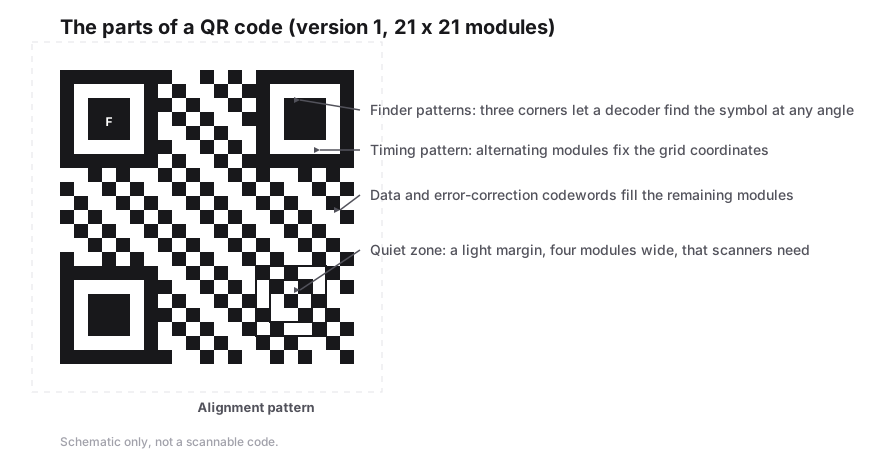
Every QR code is made of the same functional building blocks. Some of them help a scanner find and orient the symbol, others describe how the data is encoded, and the remaining area holds the actual data and error correction codewords. Understanding these parts explains why some design changes are safe and others break scanning.
The three large squares in the corners are the most recognisable feature. Because they sit in only three corners, a reader can tell which way the code is rotated. The thin strips of alternating modules between them act like a ruler, letting software work out the module grid even when the image is skewed or slightly distorted.
- Finder patterns: three 7×7 module squares in the top-left, top-right and bottom-left corners that let a scanner locate the code and determine its orientation.
- Separators: a one-module-wide light border around each finder pattern that keeps it distinct from the data area.
- Timing patterns: alternating dark and light modules running between the finder patterns, used to calculate module size and grid coordinates.
- Alignment patterns: smaller 5×5 squares present from version 2 upward that help correct perspective distortion on larger codes.
- Format information: 15 bits stored next to the finder patterns that record the error correction level and the mask pattern used.
- Version information: two 6×3 blocks included from version 7 upward that state the symbol version.
- Quiet zone: an empty light margin around the whole symbol, specified as four modules wide, which separates the code from its surroundings.
Versions: from 21×21 to 177×177 modules
The size of a QR code grid is described by its version, which runs from 1 to 40. Version 1 is 21×21 modules, and each step up adds four modules per side, so the side length equals 17 plus four times the version number. Version 40, the largest, is 177×177 modules. A version number says nothing about the printed size in centimetres; it only describes how many modules the grid contains.
Generators normally pick the smallest version that fits your data at the chosen error correction level. A short URL might fit in version 2 or 3, while a long vCard can push the code to version 10 or beyond. Higher versions pack modules more densely, so they need to be printed larger to remain easy to scan. Keeping the payload short is the simplest way to keep a code small and reliable.
| Version | Grid size (modules) | Notes |
|---|---|---|
| 1 | 21×21 | Smallest standard QR code, no alignment pattern |
| 2 | 25×25 | First version with an alignment pattern |
| 7 | 45×45 | First version with version information blocks |
| 10 | 57×57 | Common for longer URLs or small contact cards |
| 25 | 117×117 | Dense; needs a larger print size |
| 40 | 177×177 | Largest standard version |
Error correction: L, M, Q and H
QR codes use Reed–Solomon error correction, the same family of mathematics used on CDs and in deep-space communication. Extra codewords are calculated from the data and stored alongside it. If part of the symbol is dirty, scratched, poorly printed or covered, the decoder can use those extra codewords to reconstruct what is missing, up to a limit set by the chosen level.
There are four levels. Level L can restore roughly 7% of codewords, M about 15%, Q about 25% and H about 30%. Higher levels make a code more robust but consume space, so the same data needs a larger version. That trade-off matters: a level H code of a long URL will be noticeably denser than a level L code of the same URL.
Error correction is also what allows a small logo in the middle of a QR code. The logo hides some modules, and error correction compensates. That is why it is sensible to choose Q or H when adding a logo, keep the logo modest in size and never cover the finder patterns. In the PureTools QR code generator you can select L, M, Q or H directly and preview the result before exporting.
Data modes and maximum capacity
A QR code does not store every character the same way. The standard defines several encoding modes, and each one packs data with a different efficiency. Numeric mode stores three digits in 10 bits, alphanumeric mode stores two characters in 11 bits, byte mode uses 8 bits per byte, and kanji mode stores each double-byte Shift JIS character in 13 bits. A single code can mix segments in different modes to save space.
Alphanumeric mode is limited to digits, uppercase letters A to Z, the space and the symbols $ % * + - . / and colon. Lowercase letters and most punctuation require byte mode, which is the mode used for typical URLs and any text containing accents or non-Latin scripts encoded as UTF-8. The figures below are the maximum capacities of the largest symbol, version 40 at error correction level L.
| Mode | Characters allowed | Max capacity (version 40-L) |
|---|---|---|
| Numeric | Digits 0–9 | 7,089 digits |
| Alphanumeric | 0–9, A–Z, space, $ % * + - . / : | 4,296 characters |
| Byte | Any 8-bit data, commonly UTF-8 text | 2,953 bytes |
| Kanji | Shift JIS double-byte characters | 1,817 characters |
How a phone camera decodes a QR code
When you point a phone at a QR code, the camera software continuously analyses video frames looking for the distinctive ratio of dark and light bands that crosses each finder pattern. Once it finds three of them, it knows where the code is and how it is rotated. It then uses the timing and alignment patterns to correct for perspective and map every module onto a regular grid.
Next the decoder reads the format information to learn the error correction level and mask pattern. Masking is a step applied during generation that flips modules in a fixed pattern to avoid large blocks of one colour; the reader reverses it. The decoder then collects the codewords, applies Reed–Solomon correction, splits the bitstream into its mode segments and turns them back into text or bytes.
Finally the operating system inspects the decoded text. If it recognises a known format, such as a web address or Wi-Fi credentials, it offers a relevant action like opening a browser or joining a network. Apple added native QR scanning to the iPhone camera in iOS 11 in 2017, and most current Android camera apps or Google Lens provide the same capability.
Common payload formats phones understand
A QR code only stores text or bytes; it has no built-in idea of what a link or contact is. Meaning comes from widely recognised text conventions that scanning apps detect. Using the correct format is what turns a scan into a one-tap action instead of a block of plain text the user has to copy manually.
PureTools includes dedicated generators for these formats, so you fill in fields and the correct syntax is produced for you. Codes are generated in your browser, are free with no sign-up or watermark, and can be exported as SVG, PNG or PDF. Because they are static, the content is stored in the code itself and does not expire.
- URL: a web address such as https://example.com, which opens in the browser.
- Wi-Fi: WIFI:T:WPA;S:NetworkName;P:password;; lets a phone join a network without typing the password.
- Contact card: a vCard block starting with BEGIN:VCARD and ending with END:VCARD that can be saved to the address book.
- Email: mailto:name@example.com, optionally with subject and body parameters, which opens a pre-filled message.
- Phone: tel:+15551234567, which offers to dial the number.
- SMS and location: formats such as SMSTO: and geo: are also widely supported by scanning apps.
Frequently Asked Questions
Who invented the QR code?
The QR code was invented in 1994 by Denso Wave, part of the Japanese Denso group, to track automotive parts during manufacturing. The company published the specification openly and did not enforce its patent on the standard, and it was later adopted as the international standard ISO/IEC 18004.
How much data can a QR code hold?
The largest QR code, version 40 at error correction level L, can hold up to 7,089 numeric digits, 4,296 alphanumeric characters or 2,953 bytes. In practice you should store far less. Shorter payloads produce smaller, less dense codes that scan faster and more reliably on ordinary phones.
Which error correction level should I use?
Level M is a sensible default for most printed codes. Choose L when you need the smallest possible code in a clean environment, and Q or H when the code may get damaged or when you place a logo over the centre. Higher levels add robustness but make the code denser.
Do QR codes expire?
A standard static QR code cannot expire on its own, because the data is encoded directly in the pattern. It keeps working as long as the content stays valid, for example as long as the website it points to remains online. Expiry only happens with redirect-based services that stop forwarding scans.
Why are there three squares in the corners?
Those squares are finder patterns. Their fixed 1:1:3:1:1 ratio of dark and light bands is easy for software to detect, and placing them in three corners lets the scanner determine the position, size and rotation of the code, so it can be read from any angle.
Sources & further reading
About the author — PureTools Editorial Team
QR and barcode documentation
The PureTools team writes and maintains the guides on this site. Every page is checked against the published symbology specifications before it is updated, and corrections are welcome by email.
Editorial policy and corrections