How to use the Codabar generator
- 1
Wrap your value
Start and end the value with one of the letters A, B, C or D, for example A12345678B. Your system documentation will say which pair to use.
- 2
Check the preview
The preview updates as you type and shows an error for unsupported characters.
- 3
Download
Export the barcode as SVG or PDF for card printing, or PNG for labels.
Features
- Digits plus - $ : / . + characters
- Start and stop characters A, B, C or D
- Self-checking structure that tolerates dot-matrix and inkjet printing
- Export SVG, PNG or PDF
- Generated in your browser with no account or watermark
A format built for simple printers
Codabar dates from 1972 and was designed to be printed by the impact and dot-matrix printers of the time. Each character is separate from its neighbours, and every character has a fixed structure, which makes the format forgiving of uneven ink and slight smudging.
It became the standard for many library systems, blood banks (it was used in the ISBT system before ISBT 128), photo labs and courier air waybills. Many of those installations still run today, which is why new Codabar labels are still printed.
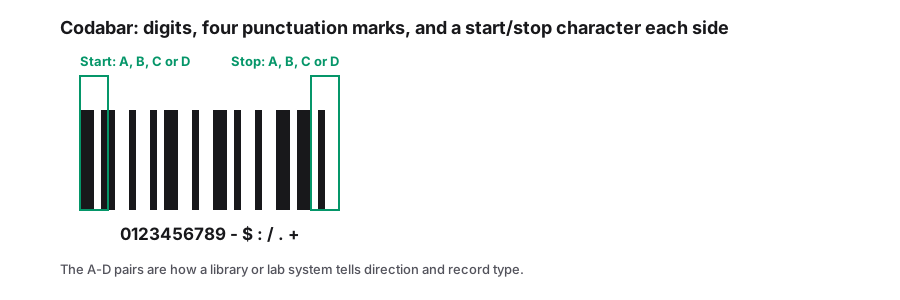
Codabar character set
| Type | Characters |
|---|---|
| Data | 0 1 2 3 4 5 6 7 8 9 - $ : / . + |
| Start / stop | A B C D (sometimes shown as T N * E) |
When to choose something else
- For new systems with no Codabar requirement, use Code 128. It is denser and has a built-in checksum.
- For blood and tissue products, modern systems use ISBT 128, which is based on Code 128.
- If you are replacing an existing card or label, match the start and stop characters used on the old ones.
How a Codabar character is built
Every Codabar character is seven elements wide: four bars and three spaces, with exactly two of the seven printed wide. The characters sit side by side with a narrow gap between them, and nothing is shared between neighbours. That per-character structure is why the format survives impact and dot-matrix printing - smudged ink ruins one character rather than shifting the alignment of the whole symbol.
The wide-to-narrow ratio is a reader setting, usually 2:1 or 3:1. If the symbol is generated for one ratio and the scanner is configured for another, it fails in a way that looks like a print defect, so fix the ratio in both places before the first run.
| Property | Value |
|---|---|
| Elements per character | 4 bars + 3 spaces, two of them wide |
| Data characters | 0-9 plus - $ : / . + |
| Start and stop | A, B, C or D, one at each end |
| Check digit | Not part of the format |
| Length | Variable; each character adds its own fixed block |
Frequently Asked Questions
Which start and stop letters should I use?
Use whatever your library or lab system expects. Many library systems use A and B; others accept any pair. Check an existing card with a scanner to see the full value.
Does Codabar have a check digit?
The format is self-checking, so no check digit is required. Some applications add one, such as the modulo-16 check digit, as part of the data.
Is Codabar the same as NW-7?
Yes. NW-7 is the name used in Japan. Other names include USD-4, Code 2 of 7 and ABC Codabar.
Why does the scanner return the letters as well as the number?
Most readers can be set to transmit or strip the start and stop characters. If your system expects digits only, change that setting rather than editing the data, or the next reader you deploy will behave differently again.
Related generators
- MSI Barcode Generator for Warehouse Bins and Stock ControlThe old warehouse symbology, still the quickest way to label a bin: type the digits and take an MSI10 symbol with its modulo-10 check already in place.
- Code 39 Barcode Generator for Badges, Parts and AssetsCreate Code 39 (Code 3 of 9) barcodes, the self-checking format still required by many automotive, defense and access control systems.
- Code 128 Barcode Generator for Labels and InventoryThe most versatile linear barcode. Encode SKUs, serial numbers and tracking IDs with letters, digits and punctuation, then download sharp label artwork.
- Pharmacode Generator for Blister and Carton LinesTurn a number between 3 and 131070 into a Pharmacode symbol, the narrow and wide bar code used to sequence cartons on packaging machinery.
- Create Linear Barcodes Online in Every Common FormatPick a symbology, type your value and download a print-ready barcode in seconds. Code 128, EAN-13, UPC-A, Code 39, Code 93, ITF, MSI, ITF-14, Codabar and Pharmacode are all in one studio.