How to use the MSI generator
- 1
Enter the location number
Type the digits for the bin, bay or stock ticket. Letters and hyphenated prefixes are refused, so keep any "BIN-" wording as plain text beside the symbol.
- 2
Let the check digit land where it belongs
The modulo-10 character is calculated from your digits and included in the printed number line, so do not add it to your data as well.
- 3
Export at ticket size
Take SVG or PDF into the label software, or PNG if the ticket is assembled in a document. Print a test copy and read it back with the device that will be used on the aisle.
Features
- Numeric values only, matching the way the symbology is defined
- Output is MSI10: a single modulo-10 check digit appended to your digits
- Four wide-or-narrow bars per digit, opened by a single wide start bar
- Colour, bar width, height and the printed line beneath the bars all set by you
- Saved as SVG, PNG or PDF from the page, with nothing uploaded anywhere
Where MSI still earns its place
MSI is often written Plessey/MSI, after the two companies that shaped it, and it grew out of warehouse bin and stock control in the 1970s. The brief was narrow and practical: print a number cheaply on a label applicator and read it back with a wand or an early CCD. The answer was a bar-only symbology in which each digit becomes four bar-and-gap pairs, read most-significant-bit first: a 1 is a wide bar with a narrow gap, a 0 a narrow bar with a wide gap. The gap only mirrors the bar in front of it, so no separate information rides in the spaces. The symbol is opened by a single wide start bar and closed by a narrow bar, a wide gap and one more narrow bar.
Nearly all of that work stayed inside buildings. You will still find MSI on picking locations, bin labels, pallet tickets and stock-count tags, and you will rarely find it on anything that leaves the site. Its value today is that it is easy to print forgivingly and easy for an old reader to interpret - not that it carries meaning anyone outside your operation can use.
That inward focus is also the honest caveat. A symbology with no registered authority behind it has no arbiter for sizing, no published artwork tables and no guarantee that the next scanner your company buys supports it at all. MSI keeps working where one team owns the label, the printer and the reader configuration; the moment any of those three belongs to somebody else, a documented format is the safer bet.
The check digit you are actually getting
MSI is unusual in that its checksum is not one rule but several. The same digits can be printed bare, with a single modulo-10 character, with a single modulo-11 character, with two modulo-10 characters, or with a modulo-11 followed by a modulo-10 over that result. A label made under one convention and read by a scanner configured for another is rejected outright, and neither side has done anything wrong.
This page renders MSI10: it computes one modulo-10 check digit from what you type and appends it to the symbol and to the number printed beneath it. There is no selector for MSI11, MSI1010 or MSI1110 on this site and no switch to suppress the digit that is added. If your scanner specification names one of those instead, ask your label software or reader vendor whether the checksum can be applied at the reader end, or standardise your tickets on MSI10 and set the readers to match.
| Variant | What is appended to your digits | Made here |
|---|---|---|
| MSI | Nothing; the data prints exactly as typed | No |
| MSI10 | One modulo-10 check digit | Yes - this page |
| MSI11 | One modulo-11 check digit | No |
| MSI1010 | A modulo-10 digit, then modulo 10 again over it | No |
| MSI1110 | A modulo-11 digit, then a modulo-10 over the pair | No |
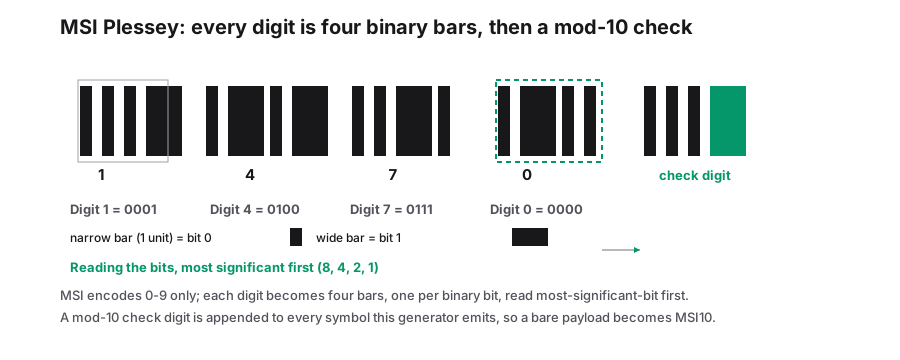
MSI beside the other numeric formats
Choosing between these three is rarely a matter of taste; the existing reader firmware decides. MSI support is optional on many scanners and switched off by default on some newer hardware, so test one label before ordering a roll of tickets. Codabar and Interleaved 2 of 5 are both covered on this site if the specification points elsewhere.
| MSI | Codabar | Interleaved 2 of 5 | |
|---|---|---|---|
| Characters | Digits | Digits plus - $ : / . + | Digits, even count |
| Element structure | Four bars per digit, no data in the gaps | Seven elements per character, printed apart | Bars and gaps interleaved in pairs |
| Check digit | Added by convention; MSI10 here | None in the format | None in the format |
| Delimiters | Fixed start and end patterns | Letters A to D, chosen by you | Fixed start and end patterns |
| Usual home | Bins and stock tickets | Library cards and lab samples | Batch and pallet numbers |
Printing tickets that read back first time
Because the element pattern itself offers no error detection, the appended check digit is doing all the work: get the variant right and a bad print becomes a rejection rather than a wrong location number on a handheld in the aisle. Start from the X-dimension, the narrowest element in the symbol, and scale everything else from it, since the ability of a reader to tell wide from narrow depends on that one measurement.
- A location code prints noticeably wider in MSI than the same digits in an interleaved format, because MSI pays for its own gaps; measure the ticket before you commit to a digit field length.
- Keep clear unprinted space at both ends; the margin control supplies background, but the reader specification governs the amount needed.
- Leave the human-readable number on the label - torn tickets get keyed, and here that line includes the added check digit.
- Enable MSI in the scanner and set its accepted length to data plus one, which is the figure most people miss.
Frequently Asked Questions
What is the difference between MSI, MSI10 and MSI11?
The suffix describes the appended checksum: plain MSI adds nothing, MSI10 adds one modulo-10 digit, MSI11 adds one modulo-11 digit, and MSI1010 and MSI1110 add two. Only MSI10 is produced here, so a specification calling for another variant needs different software or a reader-side setting.
Do I type the check digit myself?
No. Enter the location digits and the modulo-10 character is calculated and appended for you. Adding it to your data as well gives the symbol two of them and the reader reports a checksum failure.
Can MSI encode letters?
It cannot. The symbology is numeric, so a value containing letters, hyphens or a prefix such as "BIN-" needs a different format - Code 128 or Code 39 normally, or plain text printed beside a digits-only symbol.
Should I use MSI for anything that leaves my site?
Generally no. MSI has no registered meaning that an outside party can act on, and it is rarely enabled on hardware you do not control. For cartons moving through a supply chain, look at ITF-14; for items sold at a till, the number has to come from GS1 as an EAN-13 or UPC-A.
Related generators
- Codabar Barcode Generator for Libraries and LabsCreate Codabar barcodes, the simple numeric format still used on library cards, lab samples, blood bags and air waybills.
- ITF-14 Barcode Generator for Cartons and Outer CasesMake the 14-digit GTIN barcodes printed on corrugated cases and shipping cartons, with the modulo-10 check digit verified before you send artwork.
- Create Barcodes in Bulk From Excel or CSVTurn a product or asset list into print-ready barcodes in one pass. Mix symbologies in the same file and download everything as a ZIP or PDF sheet.
- Create Linear Barcodes Online in Every Common FormatPick a symbology, type your value and download a print-ready barcode in seconds. Code 128, EAN-13, UPC-A, Code 39, Code 93, ITF, MSI, ITF-14, Codabar and Pharmacode are all in one studio.