How to Get a Barcode for Your Product, Step by Step
To sell in shops and on most marketplaces you need a GTIN from GS1, then a barcode image of that number on your packaging. GS1 licenses the number; any generator, including this one, can create the artwork. Here is the whole process.
By PureTools Editorial TeamUpdated 7 min read
Number first, image second
A retail barcode has two parts that people often confuse. The number, called a GTIN (Global Trade Item Number), is what identifies your product in retailer and marketplace systems. The image is just a way of printing that number so a scanner can read it. Retailers care about the number being legitimately yours; the image can come from any software that follows the standard.
GS1 is the non-profit organisation that manages the GTIN system worldwide, through national member organisations such as GS1 US, GS1 UK and GS1 India. Only numbers licensed by GS1 are guaranteed to be unique and registered to your company.
Step 1: Decide how many numbers you need
Every distinct product variant needs its own GTIN. A T-shirt in three colours and four sizes needs twelve numbers. Multipacks and cases need their own numbers too. Count your current range and add room for growth, since GS1 pricing is tiered by how many numbers your prefix allows.
- One GTIN per size, colour, flavour or pack quantity.
- A new GTIN when the product changes significantly, such as a new net weight.
- Separate GTINs for cases and outer cartons (used in ITF-14 barcodes).
Step 2: Join GS1 or license individual numbers
| Option | Best for | Notes |
|---|---|---|
| GS1 company prefix | Brands with growing ranges | Annual fee; gives you a block of 10 to 100,000+ numbers |
| Single GTINs (where offered) | 1-10 products | Lower cost; offered by GS1 US and some other countries |
| Resold numbers | Not recommended | Often rejected by Amazon and major retailers, as they are registered to another company |
Step 3: Assign numbers and record them
Once you have a prefix, you assign the remaining digits yourself, usually in sequence: 001, 002, 003 and so on. Keep a spreadsheet that maps each GTIN to the exact product, and enter the details in the GS1 data portal so retailers can verify them. Never reuse a GTIN for a different product.
Step 4: Create the barcode artwork
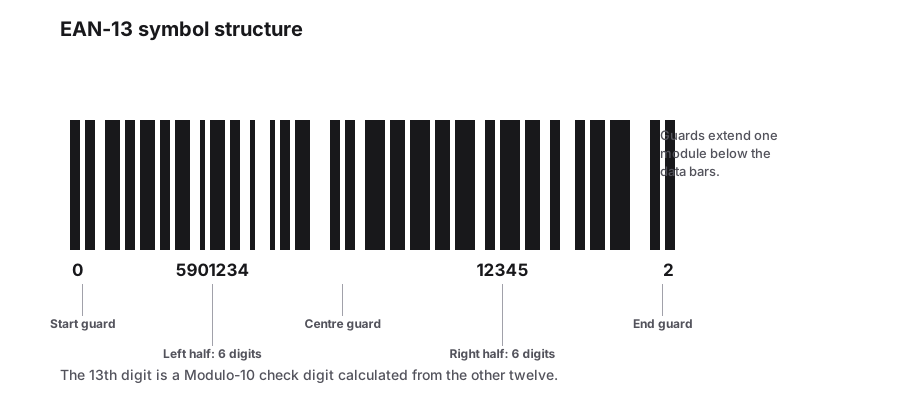
Choose the right symbology. Use EAN-13 for products sold outside North America, and UPC-A for the US and Canada (an EAN-13 starting with 0 is the same number). Use ITF-14 for outer cases. Enter the number in a generator such as the PureTools EAN-13 or UPC generator, which adds and checks the check digit, then export SVG or PDF for your packaging designer.
If you have many products, use a bulk generator: put all your GTINs in a spreadsheet and download every barcode in one ZIP file.
Step 5: Print and test
- Print at 80 to 200 percent of the nominal size (about 37 × 26 mm for EAN-13 and UPC-A).
- Do not shorten the bar height, and keep the light margins on both sides.
- Use dark bars on a light background; avoid red bars, which laser scanners cannot see.
- Place the barcode on a flat surface, ideally on the back or bottom of the pack.
- Scan proofs with a real scanner. Some retailers require a verification report showing a grade C or better.
Frequently Asked Questions
Do I need GS1 to sell on Amazon?
Amazon generally requires a GS1-registered GTIN for new product listings and checks numbers against the GS1 database. Brands enrolled in Brand Registry can sometimes apply for an exemption. Check the current Amazon seller rules for your category.
Can I make my own barcodes for free?
You can make the barcode images for free with tools like PureTools. The numbers for retail use must come from GS1. For internal use, such as stock labels, you can create your own numbering with Code 128 at no cost.
What is the difference between a UPC and an EAN?
UPC-A has 12 digits and is used mainly in North America. EAN-13 has 13 digits and is used in the rest of the world. Both are GTINs, and modern scanners read both.
Do I need a different barcode for each size and colour?
Yes. Each variant a customer can buy separately needs its own GTIN, so retailers can track stock and price for each one.
Sources & further reading
About the author — PureTools Editorial Team
Reviewed against GS1 and ISO symbology specs
Barcode and 2D code pages are reviewed against the GS1 General Specifications and the ISO/IEC bar code symbol standards, then re-checked when a specification is revised.
Editorial policy and corrections