How to use the vCard QR Code generator
- 1
Fill in your details
Enter first and last name, phone, email, company, job title and website. Leave out any field you do not want to share.
- 2
Match your brand
Set colors that fit your card design, choose rounded or dot modules, and add a small logo if there is room.
- 3
Export for print
Download SVG or PDF for your print shop, then scan a proof to confirm the contact saves correctly.
Features
- vCard 3.0 format read by iPhone and Android contacts
- Name, phone, email, company, job title and website fields
- Static code: no expiry, no monthly fee, no redirect
- Vector SVG and PDF for business card printers
- Contact details are processed in your browser only
What goes inside a vCard QR code
A vCard is a plain-text contact format that every major phone and email app understands. PureTools writes version 3.0, which starts with BEGIN:VCARD and VERSION:3.0, then lists fields for your name, phone, email, company, job title and website, and ends with END:VCARD. When scanned, the phone recognizes this block and offers to add a new contact, with no internet connection required.
Every field you add makes the code denser. Five or six fields scan easily; if you need a long address or a bio, link to a contact page with a URL code instead.
| vCard field | What it holds | Example |
|---|---|---|
| N / FN | Structured and display name | Rivera;Ana / Ana Rivera |
| TEL | Phone number | +1 555 010 2000 |
| Email address | ana@example.com | |
| ORG | Company | Rivera Design Co. |
| TITLE | Job title | Creative Director |
| URL | Website | https://example.com |
Designing a business card QR code that scans
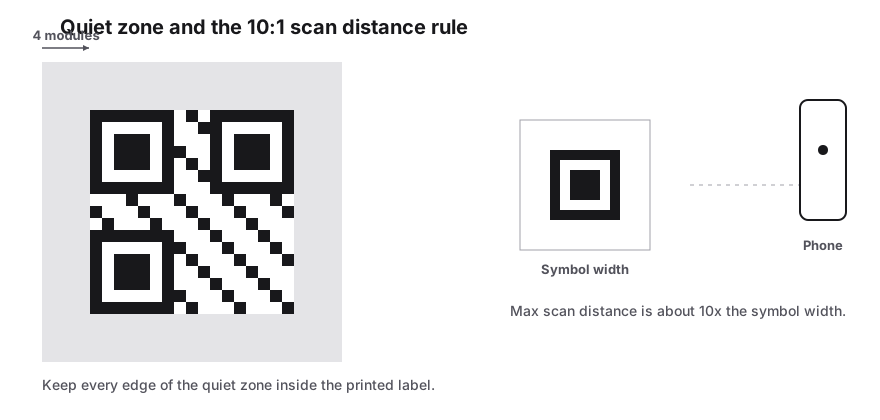
Business cards are small, so size matters more than anywhere else. Aim for at least 2 cm (0.8 in) square, keep the quiet zone clear on all four sides and avoid placing the code across a fold or near the trimmed edge. Because vCard data is longer than a typical URL, the pattern has more modules, and dark-on-light colors with high contrast help phone cameras pick them out.
If you add a logo, keep it small. Error correction rises to at least Q automatically, but a large logo on a dense code is the most common reason card codes fail. Send your printer the SVG or PDF rather than a PNG so edges stay crisp, and check a physical proof before ordering a full box.
Ideas beyond the business card
- Conference and trade show badges, so new leads save you on the spot
- Email signatures and slide decks for people who prefer to scan
- Real estate signs and flyers with the agent's direct line
- Staff ID cards that double as an internal directory
- Packaging inserts for makers and freelancers who sell direct
Frequently Asked Questions
What is the difference between a vCard QR code and a URL QR code?
A vCard QR code contains the contact details themselves, so the phone can save them without an internet connection. A URL QR code only contains a link to a web page. vCard is best for quick saving; a URL is better when you want a long profile that you can update later.
Can I update my details after printing?
No. The details are encoded directly in the static code, so changing your phone number or job title means generating a new code. The upside is that the code never expires and keeps working without any subscription. Keep your design settings handy so a new version takes a minute.
Which phones can read vCard QR codes?
Current iPhones and Android phones read vCard 3.0 codes from the built-in camera or Google Lens and show an option to add the contact. Version 3.0 is the most widely supported vCard format, which is why PureTools uses it for business card QR codes.
Why does my vCard QR code look so dense?
Each field adds characters, and more characters mean more modules in the pattern. A card with name, phone, email, company, title and website still scans easily at 2 cm or larger. If it looks crowded, drop optional fields, shorten the website address, or print the code a little bigger.
Is my contact information stored anywhere?
No. The vCard is assembled and turned into a QR code in your browser, and the details you type are not uploaded to PureTools. Nothing is kept in an account because there is no account. Once you download the file, the only copy is the one you saved.
Related generators
- Free QR Code Generator for Links, WiFi, Contacts and MoreTurn any website address into a scannable QR code in seconds, then style it with your colors and logo. The same tool also makes WiFi, contact, email, phone, event, location, UPI payment and SMS codes.
- Generate an Email QR Code With a Pre-Written MessageOne scan opens the person's mail app with the address, subject line and message already filled in. They just review it and tap Send.
- Make a Phone QR Code That Dials Your NumberScanning opens the dialer with your number ready to go. Customers tap once to call instead of squinting at a sign and typing digits.
- Create QR Codes in Bulk From a SpreadsheetFill in a template, upload it, and get every QR code named and ready to print. Everything runs in your browser.