How to use the Code 39 generator
- 1
Type the value
Enter upper-case letters, digits and the supported symbols. Lower-case input is flagged so you can correct it.
- 2
Set the dimensions
Code 39 is wide, so check the length against your label and lower the bar width if needed.
- 3
Download and print
Export vector SVG or PDF for badge templates, or PNG for documents and spreadsheets.
Features
- Encodes A-Z, 0-9, space and - . $ / + %
- Start and stop asterisks added automatically
- Flags lower-case letters and unsupported characters as you type
- SVG, PNG and PDF export for badges and labels
- Free, with no watermark, account or upload
Where Code 39 is still used
Code 39 was developed in 1974 and became one of the first alphanumeric barcodes. Each character is made of nine elements (five bars and four spaces), three of which are wide, which is where the name "3 of 9" comes from. It is self-checking, so a single printing defect cannot turn one character into another.
It is less compact than Code 128, but it remains written into many standards, including the US Department of Defense LOGMARS standard and automotive industry AIAG labels. It is also common on employee ID badges, library cards and older asset management systems.
Code 39 vs Code 128
| Code 39 | Code 128 | |
|---|---|---|
| Character set | 43 characters, upper case only | All 128 ASCII characters |
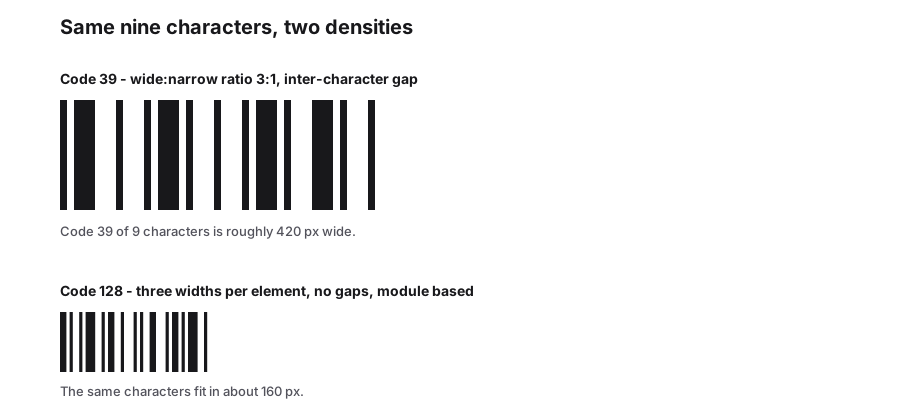
| Density | Low; wide barcodes | High; about 30-40% shorter |
| Checksum | Optional (mod 43) | Mandatory |
| Best for | Systems that require it | New projects |
Practical tips
- If your software does not specifically require Code 39, Code 128 will give you a shorter barcode.
- The asterisk (*) is reserved as the start and stop character, so it cannot appear inside your data.
- Keep at least 10 bar widths of quiet zone on each side, or a minimum of about 6 mm.
- Test with your actual scanner. Some older devices need Code 39 enabled in their settings.
Why Code 39 needs more space
A Code 39 character occupies nine elements - five bars and four spaces - of which exactly three are printed wide and the rest narrow, followed by a narrow inter-character gap. Nothing is shared between characters, so a damaged area costs one character rather than the whole run. The price is length: because every character pays for its own spacing, the same value takes roughly twice the label width that Code 128 needs.
The plain alphabet is 43 characters plus the asterisk that frames the symbol. Lower-case letters only exist through Extended Code 39, which encodes them as pairs such as $A for a. A reader that is not configured for the extension hands back the pair, so test with the hardware that will actually be used.
| Property | Value |
|---|---|
| Elements per character | 5 bars + 4 spaces, three of them wide |
| Character set | 43 data characters, plus * as start and stop |
| Lower case | Available only as Extended Code 39 pairs |
| Check digit | Optional, modulo 43 |
| Density | About half that of Code 128 for the same text |
Frequently Asked Questions
Why can Code 39 not encode lower-case letters?
The standard character set has only 43 characters. An "extended" Code 39 mode uses character pairs to represent full ASCII, but the scanner must be configured for it. For mixed case, Code 128 is a simpler choice.
Do I need to add asterisks to my value?
No. The generator adds the start and stop characters automatically. Enter only the data you want to encode.
Is a check digit required?
Not by the standard. Some industries require the optional modulo-43 check character. If yours does, calculate it and append it to the value.
Is the asterisk part of my data?
No. It marks the start and stop of the symbol, and readers normally strip it before the value reaches your application. If you see it in the scanned output, the delimiter setting on the scanner is the thing to change.
Related generators
- Code 93 Barcode Generator for Internal IdentifiersA denser, self-checking step up from Code 39: type an uppercase code and get a symbol with both check characters already calculated.
- Code 128 Barcode Generator for Labels and InventoryThe most versatile linear barcode. Encode SKUs, serial numbers and tracking IDs with letters, digits and punctuation, then download sharp label artwork.
- Codabar Barcode Generator for Libraries and LabsCreate Codabar barcodes, the simple numeric format still used on library cards, lab samples, blood bags and air waybills.
- Create Barcodes in Bulk From Excel or CSVTurn a product or asset list into print-ready barcodes in one pass. Mix symbologies in the same file and download everything as a ZIP or PDF sheet.
- Create Linear Barcodes Online in Every Common FormatPick a symbology, type your value and download a print-ready barcode in seconds. Code 128, EAN-13, UPC-A, Code 39, Code 93, ITF, MSI, ITF-14, Codabar and Pharmacode are all in one studio.