How to use the Micro QR generator
- 1
Keep the data short
Enter a short serial number or ID. Micro QR is for a few characters, not URLs or long text.
- 2
Check the preview
The generator picks the smallest version that fits. If the data is too long, switch to Data Matrix or a regular QR code.
- 3
Export
Download SVG for laser marking and PCB silkscreen, or PNG for label printers.
Features
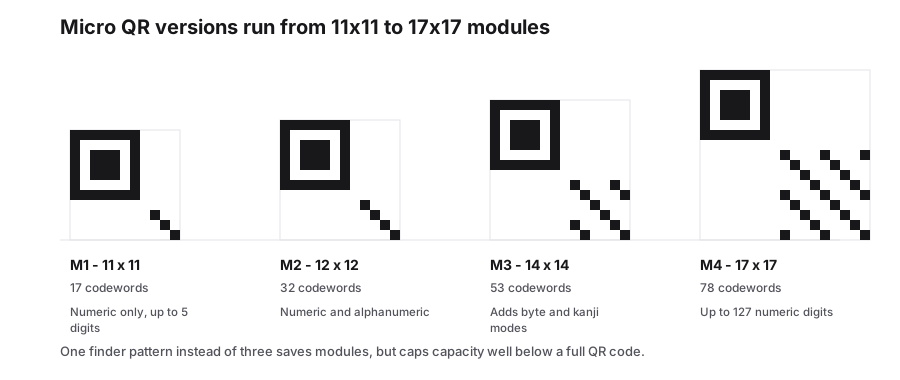
- Versions M1-M4, from 11×11 to 17×17 modules
- One finder pattern and a 2-module quiet zone
- Holds up to 35 digits or 21 alphanumeric characters
- SVG, PNG and PDF export for marking and labels
- Generated in your browser, free and unwatermarked
What makes Micro QR different
Micro QR was introduced by Denso Wave as a compact version of the QR code. Instead of three finder patterns, it has a single one in the top-left corner, and the quiet zone is only two modules instead of four. This saves a large share of the area, so a Micro QR code can be a fraction of the size of the smallest regular QR code holding the same data.
The trade-off is capacity and compatibility. Micro QR holds at most 35 digits, and most phone cameras do not recognise it. It is intended for industrial scanners reading parts, circuit boards and small components.
Micro QR versions and capacity
| Version | Size (modules) | Max digits | Max alphanumeric |
|---|---|---|---|
| M1 | 11×11 | 5 | Not supported |
| M2 | 13×13 | 10 | 6 |
| M3 | 15×15 | 23 | 14 |
| M4 | 17×17 | 35 | 21 |
When to use Micro QR
- Use it for short serial numbers on small parts, PCBs and medical devices read by industrial imagers.
- Use a regular QR code if consumers will scan it with a phone camera.
- Use Data Matrix if you need more data in a similar small area, or if your industry standard requires it.
- Always test with the actual scanner on the production line, since not every imager has Micro QR enabled by default.
What each Micro QR version holds
Micro QR trades capacity for its single finder pattern, and the remaining allowance depends on the mode. Numeric digits pack most efficiently, byte data least. Version M1 accepts numeric data only, so no amount of trimming will fit a URL or a contact into it.
Error correction narrows too. The smallest versions offer fewer levels than a full QR code, so a Micro QR with a logo sitting on top of it is a worse bet than the equivalent QR symbol. When the payload and the space allow it, step up one version rather than dropping the error correction.
| Version | Modules | Capacity at its most efficient level |
|---|---|---|
| M1 | 11 × 11 | 5 numeric digits |
| M2 | 12 × 12 | 10 numeric or 6 alphanumeric characters |
| M3 | 14 × 14 | 23 numeric, 14 alphanumeric or 9 bytes |
| M4 | 17 × 17 | 35 numeric, 21 alphanumeric or 15 bytes |
Frequently Asked Questions
Can a phone scan a Micro QR code?
Most built-in phone cameras cannot. Some third-party scanner apps can. Micro QR is meant for industrial scanners, so use a regular QR code for consumer-facing labels.
Can Micro QR store a URL?
Only a very short one. The largest version holds 21 alphanumeric characters in upper case only, which rules out most web addresses.
Is "QR Code" a trademark?
Yes. QR Code is a registered trademark of DENSO WAVE INCORPORATED. The QR and Micro QR specifications are open for anyone to use.
Will an ordinary QR reader scan a Micro QR code?
Current phone cameras and most reader SDKs handle Micro QR, but older fixed-mount scanners sometimes do not. Test with the hardware that will read it, and fall back to a version 1 QR code if the symbol has to survive on unknown equipment.
Related generators
- Free QR Code Generator for Links, WiFi, Contacts and MoreTurn any website address into a scannable QR code in seconds, then style it with your colors and logo. The same tool also makes WiFi, contact, email, phone, event, location, UPI payment and SMS codes.
- Data Matrix Code Generator for Parts, Pharma and LabelsEncode serial numbers, URLs and GS1 data in a tiny square that stays readable even when partly damaged. Download vector files for marking and printing.
- Create 2D Barcodes: Data Matrix, Aztec, PDF417, DotCode and Micro QROne studio for the two-dimensional symbologies used on packaging, parts, labels and tickets. Pick a format, enter your data and download print-ready files in seconds.
- Bulk 2D Barcode Generator from a SpreadsheetOne column of values in, a folder of labelled 2D symbols out. Mix Data Matrix, Aztec, PDF417, Micro QR and DotCode in the same run.