How to use the Bulk 2D Codes generator
- 1
Download the 2D template
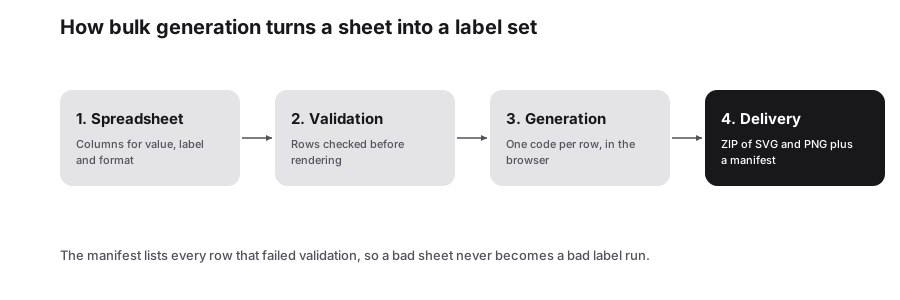
The template has Matrix Data, Symbology, Label / Filename and Notes columns. Fill it in Excel, Google Sheets or your own tool and save it as CSV or XLSX.
- 2
Upload and check the preview
Every row renders a symbol in the preview. Fix the rows that report an error before exporting, since a bad value usually means a character the symbology cannot carry.
- 3
Export the batch
Take the ZIP of vector SVG files for artwork, PNG for label software, or the PDF sheet when someone needs to print and cut.
Features
- Per-row symbology column: datamatrix, aztec, pdf417, dotcode or microqrcode
- Your own label column decides every filename in the download
- ZIP of PNG or SVG files, a results sheet, or a printable PDF
- Rows that fail validation are reported instead of silently skipped
- The spreadsheet is parsed in your browser and never uploaded
How the 2D template works
| Column | What it does |
|---|---|
| Matrix Data | The payload for that row: a GTIN and serial, a URL, a part number |
| Symbology | datamatrix, aztec, pdf417, dotcode or microqrcode, set per row |
| Label / Filename | The name of the exported file, so the symbol matches your record |
| Notes | Free text carried into the results sheet for the person doing the printing |
Choosing a symbology per row
Mixing families in one run is the point of the 2D template. A parts list might need Data Matrix for direct part marking, PDF417 for the paperwork that travels with the pallet, and DotCode for the carton printed on the line. Each row is rendered by its own symbology, so you download one folder that matches the job.
Where a customer specification names the symbol, follow it. The families differ in capacity, minimum print size and which readers handle them, and those differences are decided by the scanner already installed, not by preference.
Getting a clean batch
- Keep one value per row and no stray spaces; padding characters change the payload.
- Use a label column that is unique, or files overwrite each other in the ZIP.
- Set the module size for the smallest symbol in the run, then check the longest payload separately.
- Spot-check the first, middle and last rows against the source sheet after exporting.
Limits worth knowing
Rendering happens in your browser tab, so a very large run is bounded by the memory of the machine rather than by a quota on our side. Splitting a few thousand rows into separate files is usually faster than pushing one enormous sheet through and waiting.
The tool produces symbols from the values you supply. It does not assign identifiers, check that a GTIN belongs to you, or validate a serialization scheme against a regulatory database.
Frequently Asked Questions
Can I generate QR codes in bulk too?
Yes, the same studio has a QR category with its own template. This page is for the industrial 2D families that QR readers do not always handle.
Which symbology names does the template accept?
datamatrix, aztec, pdf417, dotcode and microqrcode, in lower case or upper case. Anything the renderer does not recognise is reported as a failed row rather than guessed at.
Is my data uploaded?
No. The file is parsed and every symbol is drawn locally, so part numbers and serial values stay on your machine.
Can I print directly from the export?
The PDF sheet is printable as it is. For label printers, use the PNG files at the size your software expects, or the SVG files when the artwork will be resized.
Related generators
- Create QR Codes in Bulk From a SpreadsheetFill in a template, upload it, and get every QR code named and ready to print. Everything runs in your browser.
- Create Barcodes in Bulk From Excel or CSVTurn a product or asset list into print-ready barcodes in one pass. Mix symbologies in the same file and download everything as a ZIP or PDF sheet.
- Data Matrix Code Generator for Parts, Pharma and LabelsEncode serial numbers, URLs and GS1 data in a tiny square that stays readable even when partly damaged. Download vector files for marking and printing.
- DotCode Generator for High-Speed PackagingCreate DotCode symbols designed for the dot printers and laser markers that run on production lines, then export them as SVG or PNG.