How to use the Pharmacode generator
- 1
Enter the number
Type the value between 3 and 131070 that your line logic expects. The preview redraws as you type and flags anything outside the range.
- 2
Check the bar widths
Compare the narrow and wide bars against the marking resolution you have. If the narrowest bar is smaller than the printer can hold, increase the size rather than the density.
- 3
Download and test
Export SVG for the artwork or PNG for a quick print, then scan it with the reader on the line before the run starts.
Features
- Every integer from 3 to 131070, the full Pharmacode range
- Symbol length grows automatically with the number
- SVG and PNG export sized for line printing
- Encoded in your browser, so your numbers are not uploaded for rendering
- No watermark, no sign-up and no usage limit
What a Pharmacode actually encodes
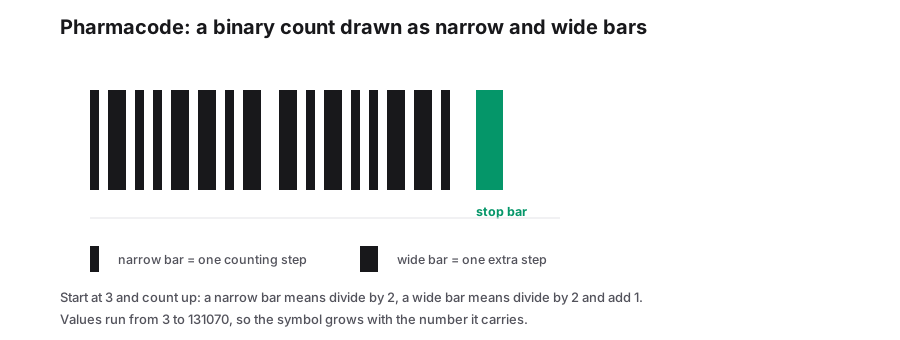
A Pharmacode is not a product identifier. It encodes a single integer, and machinery uses that integer to sort, sequence or reject cartons as they move along the line. The number is drawn entirely as bar widths: reading the symbol from the bottom upwards, a narrow bar takes the running value and divides it by two, while a wide bar divides by two and adds one. Building the number down to 3 produces the bar sequence, which is why longer numbers make taller symbols.
The format was developed by Medicode in the 1980s for pharmaceutical packaging and is still specified by many blister and carton lines. Because the alphabet is only the two bar widths, the symbol is easy to print on simple equipment and easy for a dedicated reader to interpret.
Rules before you print
| Constraint | Detail |
|---|---|
| Value range | 3 to 131070 inclusive. Zero, one and two have no symbol. |
| Direction | Read from the bottom of the symbol upwards, so orientation on the carton matters. |
| Bar ratio | A wide bar is twice the narrow bar. Printers that smear the ratio will misread the value. |
| Check digit | None. The format relies on the reader, so verify the first units off the line. |
| Quiet zone | Clear space above and below the bar stack, in the reading direction. |
Where it is used
- Blister and carton counting on pharmaceutical packaging lines.
- Sorting and reject gating, where the machine only needs a number to match against a recipe.
- Bottle and tube sequencing on lines that cannot justify a full Data Matrix serialization setup.
When to use something else
If the code has to identify a product rather than sequence a package, use a real product identifier: a Data Matrix or Code 128 carrying a GTIN, serial or lot number. Pharmacode carries one integer and nothing else, so it cannot hold dates, lot codes or GS1 application identifiers.
For regulated pharmaceutical serialization, the customer or regulator specification decides the symbol, and it is usually GS1 DataMatrix. Read that specification before generating anything.
Frequently Asked Questions
Why does the symbol get taller for bigger numbers?
Each bar contributes one step of the binary-style count, so a larger number needs more steps. The tallest symbols correspond to values near the 131070 ceiling.
Can a Pharmacode be scanned by a phone?
Not with a standard camera app. It is a machine-reading format, so test with the line reader that will actually use it.
Is there a check digit to catch a misprint?
No. The value is read directly from the bar widths, which is why print quality and the narrow-to-wide ratio matter more than they do in formats with built-in checksums.
Related generators
- Create Linear Barcodes Online in Every Common FormatPick a symbology, type your value and download a print-ready barcode in seconds. Code 128, EAN-13, UPC-A, Code 39, Code 93, ITF, MSI, ITF-14, Codabar and Pharmacode are all in one studio.
- ITF-14 Barcode Generator for Cartons and Outer CasesMake the 14-digit GTIN barcodes printed on corrugated cases and shipping cartons, with the modulo-10 check digit verified before you send artwork.
- Create Barcodes in Bulk From Excel or CSVTurn a product or asset list into print-ready barcodes in one pass. Mix symbologies in the same file and download everything as a ZIP or PDF sheet.
- DotCode Generator for High-Speed PackagingCreate DotCode symbols designed for the dot printers and laser markers that run on production lines, then export them as SVG or PNG.