How to use the ITF-14 generator
- 1
Build the GTIN-14
Put a packaging indicator digit (1-8) in front of the first 12 digits of the GTIN-13 for the item inside, then recalculate the check digit.
- 2
Enter 14 digits
Paste the GTIN-14. The generator validates the check digit before you print.
- 3
Export for the carton
Download SVG or PDF for the carton printer, keeping the barcode large. This export is the bar pattern only, so pre-print artwork supplies the bearer frame.
Features
- Encodes 14-digit GTIN-14 numbers with check digit validation
- Exports the symbol itself; bearer bars are added by pre-print artwork
- Wide bars that tolerate printing directly on corrugated board
- SVG, PNG and PDF export for carton artwork
- Bulk mode for whole product ranges from one spreadsheet
What ITF-14 is for
ITF-14 is the GS1 barcode for trade items that are not sold at a retail checkout: cases, cartons and inner packs that move through warehouses and distribution centres. It encodes a GTIN-14 using Interleaved 2 of 5, a numeric-only symbology with wide bars that tolerates low-quality printing on brown cardboard.
The thick rectangle around the bars is called a bearer bar. It spreads printing plate pressure evenly and stops a scanner from reading a partial barcode when the edges of the print are faint. What this page downloads is the bar pattern on its own; the frame is printed as part of the pre-print carton artwork, so your printer or label software adds it.
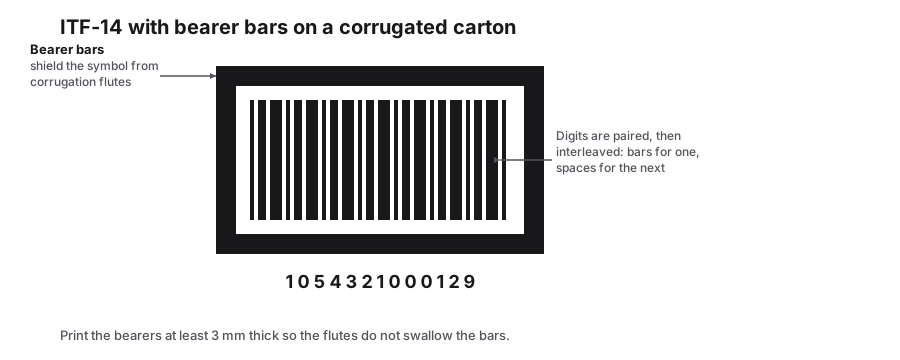
How the 14 digits are built
For example, a case of 12 units of a product with the GTIN-13 5901234123457 could use 1 as the indicator, giving 1590123412345 and a new check digit. A case of 24 units would use a different indicator, such as 2, so each pack size has its own number.
| Position | Content |
|---|---|
| 1 | Packaging indicator: 1-8 for different case sizes, 9 for variable measure |
| 2-13 | The first 12 digits of the GTIN-13 of the item inside |
| 14 | A new check digit calculated over the first 13 digits |
Printing guidelines
- GS1 recommends a magnification of 50 to 200 percent. On corrugated board, 62.5 percent or more is safer.
- Keep the bearer bar fully visible on all four sides, or at least at the top and bottom.
- Place the barcode on at least two adjacent sides of the case so it can be scanned on a conveyor.
- The bottom of the bars should be about 32 mm above the base of the carton.
The dimensions that get a carton rejected
ITF-14 is specified as a range rather than one size. The narrow bar prints anywhere between 0.495 mm and 1.016 mm, and everything else scales from that choice, so pick the X-dimension from the space available and the printing process you have rather than resizing a finished artwork.
The bar-width ratio is what an auditor measures. ITF-14 targets 2.5:1 between wide and narrow bars and accepts 2.25:1 to 3:1. Flexographic printing on corrugated board spreads ink and moves that ratio, which is the second reason for the bearer bars: the thick frame absorbs the spread that would otherwise distort the outermost bars.
| Property | Specification |
|---|---|
| Data | 14 digits, including the check digit |
| Symbology | Interleaved 2 of 5, digits only |
| X-dimension | 0.495 mm to 1.016 mm |
| Wide to narrow ratio | 2.5:1 target, 2.25:1 to 3:1 accepted |
| Bearer bars | Expected on corrugated shipping cartons |
| Human-readable text | The GTIN-14 printed where staff can key it |
Frequently Asked Questions
Can I use ITF-14 on consumer packaging?
No. Retail checkouts expect EAN-13 or UPC-A on individual items. ITF-14 is only for outer cases and cartons handled in the supply chain.
Is GTIN-14 the same as EAN-14?
Yes. EAN-14 is an older name for the GTIN-14 data structure. ITF-14 is one way to print it; GS1-128 is another.
Do I need GS1 membership for ITF-14?
Yes, if the cases go to retailers or distributors. The GTIN-14 is derived from your GS1-issued product numbers, so it must come from your company prefix.
Are bearer bars optional?
On corrugated cartons they are effectively required, because the flutes distort the outer bars and the bearer frame compensates for it. On a smooth pre-printed label they can be left out where the customer specification allows, but check before you change it. Either way the frame is not something this generator draws; it comes from the carton artwork.
Related generators
- Interleaved 2 of 5 Barcode Generator for Even Digit StringsBars carry the first digit of each pair and the gaps carry the second: plain ITF for batch numbers, bins and pallet codes with an even digit count.
- EAN-13 Barcode Generator for Retail ProductsType your 12-digit GTIN and the check digit is calculated for you. Download crisp EAN-13 artwork for packaging, labels and marketplace listings.
- UPC-A Barcode Generator for US and Canadian RetailCreate the 12-digit UPC-A barcodes that retailers in North America scan at checkout. The check digit is calculated for you, and you can download print-ready artwork.
- Pharmacode Generator for Blister and Carton LinesTurn a number between 3 and 131070 into a Pharmacode symbol, the narrow and wide bar code used to sequence cartons on packaging machinery.
- Create Barcodes in Bulk From Excel or CSVTurn a product or asset list into print-ready barcodes in one pass. Mix symbologies in the same file and download everything as a ZIP or PDF sheet.