How to use the DotCode generator
- 1
Type the value
Enter the text you want encoded. DotCode carries full ASCII, so serial numbers, dates and product codes all work.
- 2
Check the preview
The preview redraws as you type. If a character is outside the supported range the tool says so instead of producing a symbol that will not scan.
- 3
Export
Download SVG when the marking system can accept vector artwork, or PNG when you only need a print proof or a scanner test.
Features
- Two-row DotCode symbols generated locally in your browser
- Full ASCII text, the character set DotCode was designed around
- SVG export for line printing and PNG export for proofing
- Adjustable module size and colours before you download
- No account, no watermark and no data uploaded to a server
What DotCode is for
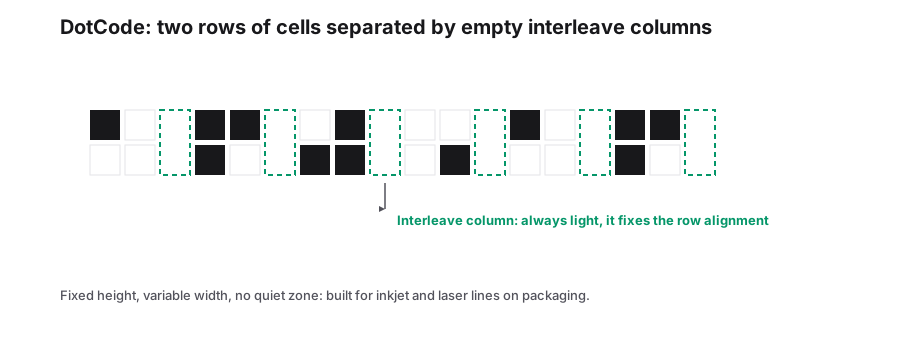
DotCode is a two-row 2D barcode published as ISO/IEC 23791 and created for the marking technologies that actually sit on packaging lines: continuous inkjet, thermal inkjet and laser ablation. Those devices place dots, they do not draw crisp bar edges, and a conventional barcode printed by them loses its precise widths. DotCode is built so that a column of cells only has to be dark or light, not exactly measured.
The symbol is read as a sequence of columns. Each column holds two cells, and the four possible dark and light combinations carry the data, which keeps the symbol short and the print tolerance high. That is why DotCode appears on cartons, blister foils and secondary packaging where the code is applied at line speed rather than pre-printed.
Where you will see it
- Pharmaceutical secondary packaging, where serialization codes are marked at line speed and verified immediately after printing.
- Consumer goods cartons printed by inkjet directly on the folding carton.
- Any line where the marking device cannot hold the bar-width tolerance a 1D code or a Data Matrix needs.
Printing rules that matter
| Topic | What to do |
|---|---|
| Character set | Keep the value inside full ASCII. DotCode has no built-in compression for non-Latin text. |
| Cell size | Set the cell size from the marking resolution, then let the symbol width follow it. |
| Contrast | Mark on a light, even background. Laser ablation on bare metal works because the etched area scatters light. |
| Verification | Grade the first symbol off the line with a verifier before the run continues, not after it finishes. |
Choosing between DotCode and Data Matrix
If the code is printed by a good thermal transfer or inkjet head at controlled speed, Data Matrix is the more common choice and the one most supply-chain specifications name. Choose DotCode when the specification allows it and the marking process cannot hold the edge accuracy a Data Matrix expects, or when the code has to be applied across a seam or in a narrow band where the two-row shape fits better.
Both are 2D symbols read by the same industrial cameras, so the decision is usually made by the customer specification rather than by the reader hardware.
Frequently Asked Questions
Can I use DotCode for regulated serialization?
Check the specification your regulator or customer issued. DotCode is accepted in some pharmaceutical packaging contexts, but the aggregation and data-format rules come from that specification, not from the symbol itself.
How much data fits in a DotCode?
DotCode is variable length, so the symbol grows with the value. In practice line codes carry short serials and product identifiers; very long payloads make a wide symbol that a narrow print head cannot mark in one pass.
Will a phone scan a DotCode?
Generally no. Consumer camera apps are built around QR and, to a lesser extent, Data Matrix. Treat DotCode as a machine-to-machine code and test it with the industrial reader that will use it.
Related generators
- Data Matrix Code Generator for Parts, Pharma and LabelsEncode serial numbers, URLs and GS1 data in a tiny square that stays readable even when partly damaged. Download vector files for marking and printing.
- Create 2D Barcodes: Data Matrix, Aztec, PDF417, DotCode and Micro QROne studio for the two-dimensional symbologies used on packaging, parts, labels and tickets. Pick a format, enter your data and download print-ready files in seconds.
- Bulk 2D Barcode Generator from a SpreadsheetOne column of values in, a folder of labelled 2D symbols out. Mix Data Matrix, Aztec, PDF417, Micro QR and DotCode in the same run.
- Pharmacode Generator for Blister and Carton LinesTurn a number between 3 and 131070 into a Pharmacode symbol, the narrow and wide bar code used to sequence cartons on packaging machinery.