How to use the Aztec Code generator
- 1
Enter the ticket data
Paste the booking reference, ticket record or URL you want to encode.
- 2
Set the size
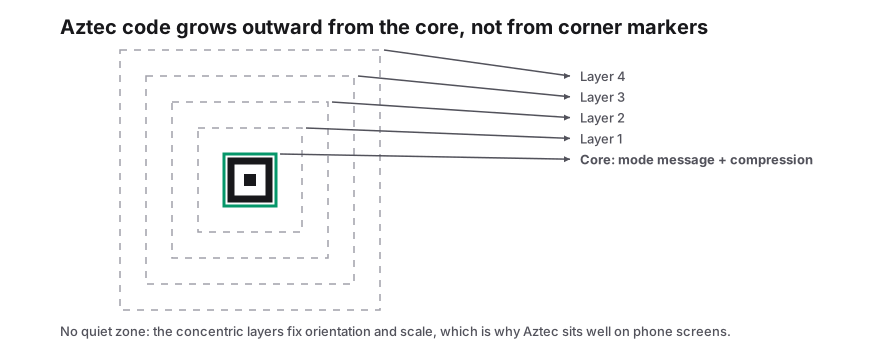
Increase the scale for print. Aztec codes grow from the centre outward as the data gets longer.
- 3
Export
Download PNG for mobile wallets and email, or SVG and PDF for printed tickets.
Features
- Central bullseye finder, so no quiet zone is required
- Adjustable error correction, typically 23% by default
- Reads well from phone screens and low-resolution prints
- SVG, PNG and PDF export with custom colors
- Generated locally, with no account or watermark
How Aztec codes work
An Aztec code is a square 2D barcode built around a bullseye of concentric squares in its centre. The scanner finds the bullseye first, then reads the data in layers that spiral outward. Because the finder is in the middle, the code does not need the empty margin that QR and Data Matrix codes require, so it can be printed right up to the edge of a ticket.
It was invented in 1995 by Andrew Longacre at Welch Allyn and published as ISO/IEC 24778. The smallest compact Aztec symbol is 15×15 modules, and the largest full-range symbol is 151×151.
Where you will see Aztec codes
- Rail tickets across Europe, including Deutsche Bahn, SNCF, Eurostar and many UIC member railways.
- Airline boarding passes on phones, alongside PDF417 on paper.
- Some event tickets and public transport passes.
- Car registration documents in several countries.
Aztec compared with QR and Data Matrix
| Aztec | QR code | Data Matrix | |
|---|---|---|---|
| Finder | Central bullseye | Three corners | L-shaped edge |
| Quiet zone | Not required | 4 modules | 1 module |
| Error correction | Selectable, 5-95% | Selectable, 7-30% | Fixed, about 30% |
| Phone camera support | Limited | Native | Limited |
Choosing a size: layers rather than pixels
Aztec symbols are measured in layers, not pixels. The smallest symbol is 15×15 modules and every extra layer adds a ring of modules around the outside, so the code grows in steps as the payload gets longer. The reader works out which version it is looking at from the small ring of modules around the bullseye, which is why one piece of scanner software can handle a wristband code and a full-page document code without being told the size in advance.
Compact Aztec stops the growth early. It keeps the same structure with a much lower ceiling, so it fits small tickets, but not every reader implements it and the payload allowance is far smaller. Use it only where the specification you are working to allows it.
Because there is no quiet zone to budget for, the printed symbol is the whole footprint. On a QR code you have to reserve four modules of clear space on every side before you know how much room the artwork needs; here all of that space is data.
| Symbol | Modules | Practical note |
|---|---|---|
| Smallest Aztec | 15 × 15 | Fits a wristband or the corner of a ticket |
| Compact Aztec | Up to 27 × 27 | Space-saving variant; check reader support first |
| Full range | Up to 151 × 151 | Standard Aztec; the version is read, not assumed |
Frequently Asked Questions
Can an iPhone or Android camera scan Aztec codes?
Native camera support is limited, but ticket gates, airport scanners and most scanner apps read Aztec codes. For codes aimed at the general public, a QR code is more widely supported.
Why do railways prefer Aztec codes?
They scan quickly from phone screens, even cracked or dim ones, and need no margin, which suits small ticket layouts. The UIC rail standard specifies Aztec for print-at-home and mobile tickets.
How much data can an Aztec code hold?
Up to about 3,000 text characters or 3,800 digits in the largest symbol at minimum error correction. Ticket data is usually much smaller.
Does an Aztec code need a margin around it?
No. The centred bullseye fixes orientation and scale on its own, so the symbol can be printed flush against other artwork. Keep the area inside the outermost data ring clear of overlapping graphics, but you do not owe it a blank border.
Related generators
- Create 2D Barcodes: Data Matrix, Aztec, PDF417, DotCode and Micro QROne studio for the two-dimensional symbologies used on packaging, parts, labels and tickets. Pick a format, enter your data and download print-ready files in seconds.
- PDF417 Barcode Generator for IDs, Tickets and DocumentsCreate the stacked 2D barcode used on driver licenses, boarding passes and shipping documents. It holds long records and can be read by linear imagers.
- Data Matrix Code Generator for Parts, Pharma and LabelsEncode serial numbers, URLs and GS1 data in a tiny square that stays readable even when partly damaged. Download vector files for marking and printing.
- Bulk 2D Barcode Generator from a SpreadsheetOne column of values in, a folder of labelled 2D symbols out. Mix Data Matrix, Aztec, PDF417, Micro QR and DotCode in the same run.