How to use the SMS QR Code generator
- 1
Write the number in international form
Include the country code and the plus, for example +919876543210. Spaces, dashes and brackets are stripped before the payload is written, and no country code is added for you.
- 2
Draft the message they will send
Type the text you want to arrive in your inbox, kept short and free of emoji if you want it to stay inside one billing segment. Whatever you write is what the customer sees, unedited.
- 3
Test on an Android phone, then print the number as text too
Scan the preview with an Android camera or a common scanner app and check a draft opens with both fields correct. Under the code, print the number and the keyword in words for anyone whose phone does not act on the payload.
Features
- One scan opens a new message with the recipient and the text already filled in
- SMSTO payload with the number reduced to digits and a leading plus automatically
- The message body is carried exactly as typed, with nothing URL-encoded or rewritten
- Carries a whole enquiry sentence, not just a number the way a phone code does
- SVG and PNG export, generated locally with no sign-up and no watermark
The payload, character by character
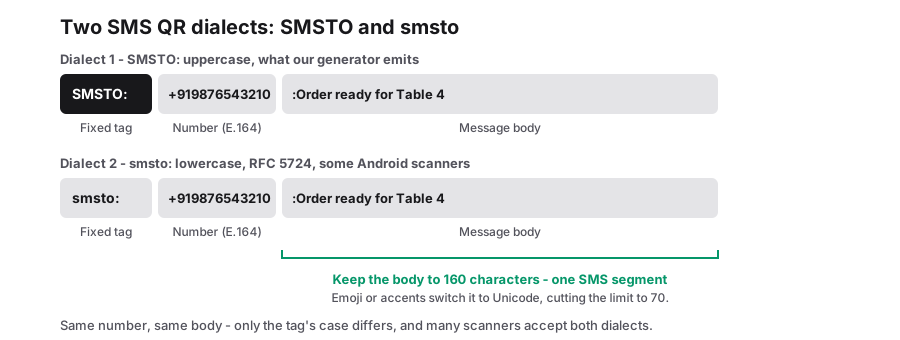
An SMS QR code carries one short line and nothing else: SMSTO, a colon, the number, another colon, then the message. A camera app that knows the convention reads that line and opens a blank message addressed to the number with your text sitting in the body. The customer still presses send. The code cannot send anything by itself, and it cannot see whether they did, so there is no record of a scan and no record of a reply.
The number field is reduced to digits and plus signs before it is written, which is usually a help. A number typed as "+91 (80) 1234 5678" leaves the tool as a clean +918012345678, because brackets, spaces and dashes only confuse a dialling hand-off. The same stripping is also the trap: the tool has no idea which country you are in and will not add a country code. A bare ten-digit mobile number stays ten digits, so the message routes correctly only for a sender already on that numbering plan, and someone roaming or holding a foreign SIM gets a failed send.
The body is handled the opposite way. It goes in exactly as typed, with spaces, punctuation and capital letters intact. Nothing is percent-encoded, because SMSTO is not a URL and the colon is the only delimiter that matters inside the payload. That means a body containing a colon will not break anything downstream either, but it does mean there is no escaping layer to protect unusual text, so keep the wording simple and check it on a real handset.
| You type in the number field | The code carries | Who it reaches |
|---|---|---|
| +919876543210 | +919876543210 | Anyone, anywhere, because the country code is present |
| 0987 654-3210 | 09876543210 | Local senders only, since the format keeps it domestic |
| +44 20 7946 0958 | +442079460958 | Only if that number can receive SMS at all |
| Call the shop now | nothing | Nobody. Letters are dropped, so the address line ends up empty |
160 characters, or 70
The length of your pre-written message decides what the customer is charged to send it, and the deciding factor is the alphabet rather than the word count. A single SMS segment carries 160 characters when the text fits GSM-7, the seven-bit alphabet the signalling systems were designed around: Latin letters, digits, spaces and ordinary punctuation. Switch the message to Unicode, because you added an emoji or wrote it in a non-Latin script, and a segment falls to 70 characters.
Longer text is split into segments and stitched back together by the receiving phone, so it still reads as one message while being billed as several. That is the practical reason to count the characters: a pleasant sentence with a smiley in it can triple the cost of a message that looks the same length to the sender.
- Accented letters and a few symbols sit outside GSM-7 and can push a whole message into Unicode, so test the exact text on a handset rather than assuming.
- If your audience reads and writes in Hindi, Tamil or another non-Latin script, accept the 70-character segment and keep the pre-filled line very short.
- The recipient pays for the message on their own plan, which is another reason to keep it under one segment where you can.
| Message you pre-fill | Alphabet used | Characters per segment | Segments for 150 characters |
|---|---|---|---|
| SEND MENU for today timings | GSM-7 | 160 | 1 |
| Send menu with an emoji at the front | Unicode | 70 | 3 |
| कृपया मेनू भेजिए, written in Hindi | Unicode | 70 | 3 or more |
| 150 characters of plain English | GSM-7 | 160 | 1 |
Where a text-me code is the right choice
The honest limits come with those strengths. This tells the phone to prepare a message; it does not guarantee one arrives, and it gives you no list of people who scanned. If the whole point of the code is to measure interest, encode a link instead and count visits. If the point is to reach a number that receives texts, this is a very short path from camera to send key, and it works on a phone with no data plan at all.
- A stall or a home kitchen with no working website, where "text MENU for timings" does the job a link would.
- Enquiry lines that need routing: a pre-filled sentence such as a flat number or an order code lands on the right desk instead of a generic "hi".
- Service vans, hoardings and pole posters, where a cold-handed customer would rather not type an address from memory.
- Audiences on basic handsets, which covers a great many first-time smartphone users and older customers who still live in the messaging app.
- Anything that should keep working when your server does not, because SMS is delivered by the mobile network rather than by a website you have to keep online.
Scanning behaviour, said straight
SMSTO as a printed payload is a de-facto convention rather than a formal standard, paired with the smsto URI scheme described in RFC 5724. Android camera software and most scanning libraries have acted on it for years, which is why a printed card can hand over a pre-filled text.
Apple built-in camera has never treated it the same way, so an iPhone pointed at your sign may show the raw string, or offer the number as a call, instead of opening Messages with your body attached. Some readers on either platform use the number and drop the text entirely. That is not a print-quality problem and a sharper code will not fix it.
So plan for a mixed audience in two cheap ways. Print the number and the keyword in plain words beneath the code, so anyone whose scan does nothing can type it in ten seconds. And if a meaningful share of your customers are on iPhones, consider putting a short link on the sign instead, made with the URL QR code type, that offers both a text and a call, and reserve the SMS code for the places where Android is the norm.
Frequently Asked Questions
Does the code send the message by itself?
No. It opens a draft with the recipient and the text in place, and the customer presses send. Nothing is recorded on your side either, so you will not know that someone scanned unless the message reaches your inbox.
Can I use it for WhatsApp instead of SMS?
Not with this payload. SMSTO hands the phone to the messaging app text path, and WhatsApp is not addressed by it. A WhatsApp click-to-chat address is an ordinary web link, so build that one with the URL QR code type and paste the link in full.
Why did the spaces disappear from my number?
The number is reduced to digits and plus signs before it is written into the payload, because spaces, dashes and brackets are not valid in the address line a phone will accept. Keep the country code and the leading plus in what you type, since nothing is added on your behalf.
Related generators
- Make a Phone QR Code That Dials Your NumberScanning opens the dialer with your number ready to go. Customers tap once to call instead of squinting at a sign and typing digits.
- Free QR Code Generator for Links, WiFi, Contacts and MoreTurn any website address into a scannable QR code in seconds, then style it with your colors and logo. The same tool also makes WiFi, contact, email, phone, event, location, UPI payment and SMS codes.
- Generate an Email QR Code With a Pre-Written MessageOne scan opens the person's mail app with the address, subject line and message already filled in. They just review it and tap Send.
- Turn Any Plain Text Into a QR CodeType a message, a code or short instructions and get a QR code that shows the text right on the scanner's screen. No website or connection required.