QR Code Error Correction Levels: L, M, Q or H
Error correction lets a QR code still scan when part of it is dirty, torn or covered. Higher levels survive more damage but need more modules, so the right level depends on the print and whether a logo sits on top.
By PureTools Editorial TeamUpdated 6 min read
What error correction actually does
A QR code stores its data twice in effect: the payload plus redundant codewords generated with Reed-Solomon error correction. If part of the symbol is unreadable, the decoder uses the redundancy to rebuild the missing characters instead of failing.
The level you pick sets how many codewords are wasted on redundancy. It is a trade between durability and density, and it is decided at generation time, not at print time.
The four levels
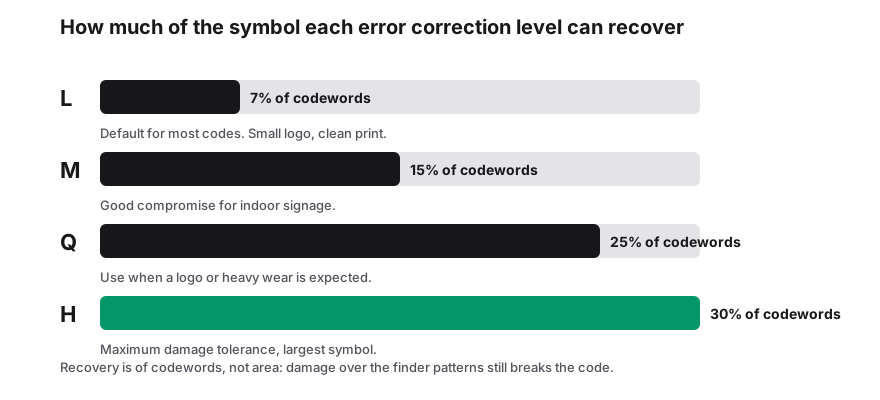
Those percentages describe codewords, not raw area. In practice a code at level H can often be decoded with a third of its surface obscured, but only if the obscured part is not one of the structural elements.
| Level | Approx. recovery capacity | Use it when |
|---|---|---|
| L | about 7% of codewords | Indoor screens, clean print, maximum data in minimum space. |
| M | about 15% | The sensible default for most posters, packaging and links. |
| Q | about 25% | Rough handling, outdoor exposure, small prints with a logo. |
| H | about 30% | A logo or large overlay, industrial labels, harsh environments. |
What recovery capacity does not protect
- The three finder patterns in the corners. Cover one and the decoder may not locate the symbol at all, regardless of level.
- The timing path and the quiet zone. A border that touches the code confuses edge detection more reliably than any amount of redundancy fixes.
- Contrast loss. Faded or low-contrast printing damages every module at once, which is not the kind of error correction is designed for.
Choosing a level for a logo
A logo in the centre destroys data modules, so the level has to be high enough to compensate. Start at Q for a small mark and move to H for anything approaching a fifth of the area, then test the real artwork rather than a mock-up.
Keep the logo well inside the symbol, never across a corner finder, and keep the module grid unbroken around it. Two phones and a tablet, in the lighting where the code will be used, is a cheap test that saves a print run.
The size cost of level H
More redundancy means more modules for the same payload, which means a larger symbol at the same module size, or a smaller effective scan distance at the same print size.
If you are printing at a poster scale, take the resilience and ignore the cost. If you are trying to fit a long URL into a 12 mm label, drop to M, shorten the content and let the extra space do the work.
Quick recommendations
- Link to a website on a flyer: M.
- Wi-Fi or contact code on a badge that gets sat on: Q.
- Branded code with a centred logo: Q or H, tested on real artwork.
- Code displayed on a TV or monitor: L or M, since screens are clean and contrast is high.
- Product packaging in a warehouse: Q, plus a verification grade check before the run.
Frequently Asked Questions
Does higher error correction make a QR code harder to scan?
It makes the symbol denser, so at a fixed print size each module is smaller and needs more resolution. On a screen or a large poster the difference is negligible; on a tiny label it matters.
Can I change the error correction level after generating?
No. The level is baked into the symbol. Regenerate the code with a different level rather than editing the image.
Is level H always the safest choice?
No. On very small prints H can make the code harder to read because the modules shrink. Match the level to the handling the code will get.
How much of a code can a logo cover?
Treat roughly 20 percent of the area as the practical ceiling at level H and test the final artwork, because the position of the overlay matters as much as its size.
Sources & further reading
About the author — PureTools Editorial Team
QR and barcode documentation
The PureTools team writes and maintains the guides on this site. Every page is checked against the published symbology specifications before it is updated, and corrections are welcome by email.
Editorial policy and corrections