How to use the Barcode generator
- 1
Choose the symbology
Select the format your scanner, retailer or software expects. If you have no requirement, Code 128 is the safest general-purpose choice.
- 2
Enter the value
Type or paste the data. The preview updates as you type and shows an error if the value has the wrong length or characters for that format.
- 3
Tune and export
Set bar width, height and margin, then download SVG for print or PNG for documents. Press Ctrl/Cmd+S to download or print straight to a label printer.
Features
- Ten 1D formats, from Code 128 and EAN-13 to Code 93, ITF, MSI and Pharmacode
- Live validation that flags values the chosen format cannot encode
- Adjust bar width, height, colors, margin and human-readable text
- Export SVG, high-res PNG or PDF, copy, or print to a label printer
- Made in your browser; the data you enter is not uploaded
Which barcode type should you use?
Linear (1D) barcodes differ in which characters they can hold, how long the value can be and who expects to read them. Retail point-of-sale systems only accept EAN-13 or UPC-A on consumer items, while warehouses, libraries and internal asset systems usually leave the choice to you. The table below summarises the formats available in this studio.
| Format | Characters | Length | Typical use |
|---|---|---|---|
| Code 128 | All 128 ASCII characters | Variable | Shipping labels, inventory, serial numbers |
| EAN-13 | Digits only | 13 (12 + check digit) | Retail products outside North America |
| UPC-A | Digits only | 12 (11 + check digit) | Retail products in the US and Canada |
| Code 39 | 0-9, A-Z, space, - . $ / + % | Variable | Automotive, defense, ID badges |
| Code 93 | 0-9, A-Z, space, - . $ / + % | Variable, plus two check characters | Denser replacement for Code 39, internal IDs |
| ITF (2 of 5) | Digits only, in pairs | Even number of digits | Warehouse bins, cartons, shipping labels |
| MSI | Digits only | Variable, plus a mod-10 check digit | Stock tickets, storage locations |
| ITF-14 | Digits only | 14 (13 + check digit) | Outer cartons and shipping cases |
| Codabar | 0-9, - $ : / . + with A-D start/stop | Variable | Libraries, labs, older logistics |
| Pharmacode | Integer 3 to 131070 | Up to 16 bars | Pharmaceutical packaging control |
Retail codes need GS1 numbers, not just an image
PureTools draws the barcode for any valid number you type, but it does not issue product numbers. EAN-13, UPC-A and ITF-14 carry a GTIN (Global Trade Item Number), and retailers and marketplaces check that the number belongs to your company through a GS1 company prefix. You obtain that prefix from your national GS1 organisation, then assign product numbers from your own range.
For anything that never leaves your own systems, such as stock locations, tool cribs, work orders or library books, you are free to invent your own numbering. Code 128 is the usual choice there because it is compact and accepts letters, digits and punctuation, so existing SKUs can be encoded unchanged.
Getting barcodes that scan first time
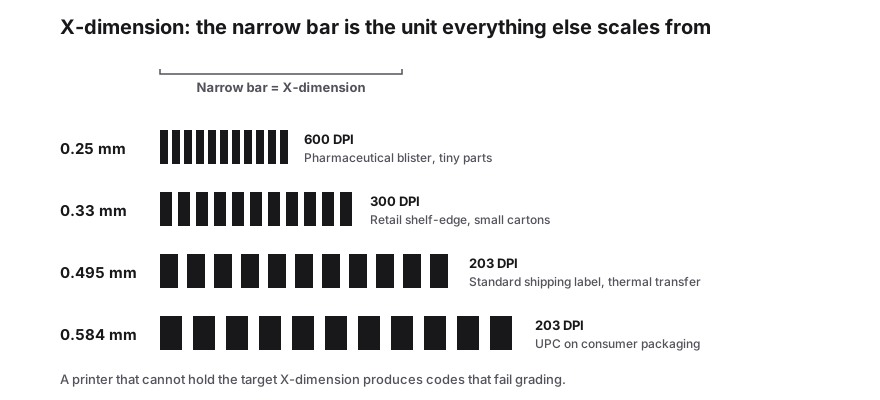
- Keep the quiet zone: leave blank space on both sides of at least 10 times the narrowest bar width (EAN and UPC need 7 to 11 times, depending on side).
- Print dark bars on a light background. Black on white is best; red bars are invisible to many laser scanners.
- Do not squash the code. Shorten it with a larger bar width setting rather than scaling the image unevenly.
- Use SVG or PDF for print artwork so bar edges stay sharp, and PNG at high resolution for documents.
- Bar height matters for hand scanning: aim for at least 15 percent of the barcode width, or about 1.3 cm.
- Print a proof on the real label stock and scan it with the actual device before a full run.
Frequently Asked Questions
Is this barcode generator free to use?
Yes. There is no account, no watermark and no limit on how many barcodes you create or download. SVG, PNG and PDF exports are all included. The site is supported by ads, but none of the generator features are locked behind a paid plan.
Which barcode format is best if I have no requirement?
Use Code 128. It encodes letters, digits and symbols, produces a shorter barcode than Code 39 for the same data and is read by virtually every modern scanner. Choose EAN-13 or UPC-A only for retail products, and ITF-14 for outer shipping cartons.
Can I make a barcode for products I sell in shops?
You can generate the image here, but the number itself must come from GS1. Retailers and marketplaces verify that the GTIN belongs to your company prefix. Once GS1 has licensed you a prefix and you have assigned a product number, enter it here to create the EAN-13 or UPC-A artwork.
Why does the tool show an error for my value?
Each symbology accepts only certain characters and lengths. EAN-13 needs 12 or 13 digits, UPC-A needs 11 or 12, ITF-14 needs 14 and Code 39 does not accept lower-case letters. The live validation message tells you what is wrong so you can fix the value or pick another format.
Can I create many barcodes at once?
Yes. The Bulk Studio takes an Excel or CSV template, or a Google Sheet, with one row per barcode. You can mix symbologies such as Code 128, EAN-13 and ITF-14 in one file, then download a ZIP of PNG or SVG images plus a printable PDF sheet.
Related generators
- Create Barcodes in Bulk From Excel or CSVTurn a product or asset list into print-ready barcodes in one pass. Mix symbologies in the same file and download everything as a ZIP or PDF sheet.
- Code 128 Barcode Generator for Labels and InventoryThe most versatile linear barcode. Encode SKUs, serial numbers and tracking IDs with letters, digits and punctuation, then download sharp label artwork.
- Code 93 Barcode Generator for Internal IdentifiersA denser, self-checking step up from Code 39: type an uppercase code and get a symbol with both check characters already calculated.
- Interleaved 2 of 5 Barcode Generator for Even Digit StringsBars carry the first digit of each pair and the gaps carry the second: plain ITF for batch numbers, bins and pallet codes with an even digit count.
- MSI Barcode Generator for Warehouse Bins and Stock ControlThe old warehouse symbology, still the quickest way to label a bin: type the digits and take an MSI10 symbol with its modulo-10 check already in place.
- Pharmacode Generator for Blister and Carton LinesTurn a number between 3 and 131070 into a Pharmacode symbol, the narrow and wide bar code used to sequence cartons on packaging machinery.
- Create 2D Barcodes: Data Matrix, Aztec, PDF417, DotCode and Micro QROne studio for the two-dimensional symbologies used on packaging, parts, labels and tickets. Pick a format, enter your data and download print-ready files in seconds.