How to use the URL QR Code generator
- 1
Paste the address
Enter the full URL, including https://. Test it in a browser first: a QR code cannot fix a link that already returns a 404.
- 2
Size it for the distance
Set the module size against how far away people will be when they scan, and keep the quiet zone clear in your artwork.
- 3
Download and verify
Export SVG for print or PNG for screens, then scan the printed proof with more than one phone before you run the full batch.
Features
- Any http or https address, including query strings and anchors
- Static output: no redirect service that can expire or be taken over
- Error correction from L to H, so a logo or scuffed print still scans
- SVG, PNG and PDF export with the size you need for the artwork
- Generated on your device, so the destination URL is never uploaded
What the code actually stores
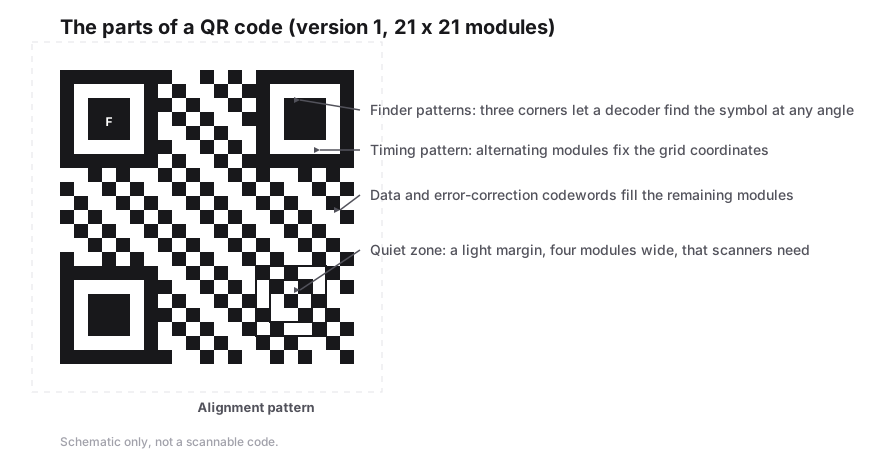
A URL QR code is a QR symbol whose payload is the address itself, written as text. Scanning it hands that text to the phone, which opens it in the default browser. There is no middleman: nothing is looked up on a server at scan time, so the code cannot stop working because a service changed its plans.
The QR specification does define a dedicated URL compression mode, but very few readers implement it, so generators encode addresses as byte or alphanumeric characters instead. The practical consequence is that the symbol size follows the character count of your link.
How long can the URL be?
A version 40 QR code at the lowest error correction level holds just under 3,000 byte-mode characters, which is far more URL than anyone prints. The real limit is readability: every extra character adds modules, and modules have to stay large enough for a phone camera to resolve at the size you print.
Tracking parameters are the usual culprit. A link carrying UTM parameters for campaign, source and medium can be twice the length of the page address itself. If the printed code is small, point it at the clean address and use a separate campaign link for measurement.
- Shorten only when you trust the shortener to keep resolving for as long as the print lives.
- Prefer a path on your own domain over a third-party redirect for anything permanent.
- Keep the query string out of the code when the same page can be found without it.
Static versus a trackable code
A static URL code cannot report how many people scanned it, because there is no hop that could count anything. Trackable codes work by encoding a short link owned by a service that redirects to your destination, which buys statistics at the cost of a dependency: if the service changes the link, the printed symbol is wrong.
For packaging, signage and anything that will outlive a marketing campaign, encode the destination directly. If you need both, print a static code to your own page and put the campaign parameters on the page itself.
Print settings that keep links scannable
| Setting | Recommendation |
|---|---|
| Error correction | M for clean printed material, Q or H when a logo sits on top |
| Quiet zone | Four modules of clear space on every side, in the background colour |
| Contrast | Dark modules on a light background; invert only after testing the result |
| Format | SVG for anything resized later, PNG at 300 dpi for a fixed print size |
Frequently Asked Questions
Will the QR code stop working if I move the page?
The symbol cannot be edited after printing, so if the address changes the code points at a dead link. Move the page with a server redirect from the old address, or encode a stable URL that you control.
Do I need the https:// prefix?
Yes. Most scanners hand the text to the browser as given, and a value without a scheme can be treated as a search term instead of an address.
Can I encode a link with a password in it?
You can, but the QR code makes it trivially readable to anyone photographing the print, and it ends up in browser history and server logs. Send credentials through a login page instead.
Does the generator store my URL?
No. The symbol is drawn by JavaScript in your browser and the address is never sent to a server, which is also why the codes work without an account.
Related generators
- Free QR Code Generator for Links, WiFi, Contacts and MoreTurn any website address into a scannable QR code in seconds, then style it with your colors and logo. The same tool also makes WiFi, contact, email, phone, event, location, UPI payment and SMS codes.
- Turn Any Plain Text Into a QR CodeType a message, a code or short instructions and get a QR code that shows the text right on the scanner's screen. No website or connection required.
- Create QR Codes in Bulk From a SpreadsheetFill in a template, upload it, and get every QR code named and ready to print. Everything runs in your browser.
- Generate an Email QR Code With a Pre-Written MessageOne scan opens the person's mail app with the address, subject line and message already filled in. They just review it and tap Send.