How to use the Bulk Barcodes generator
- 1
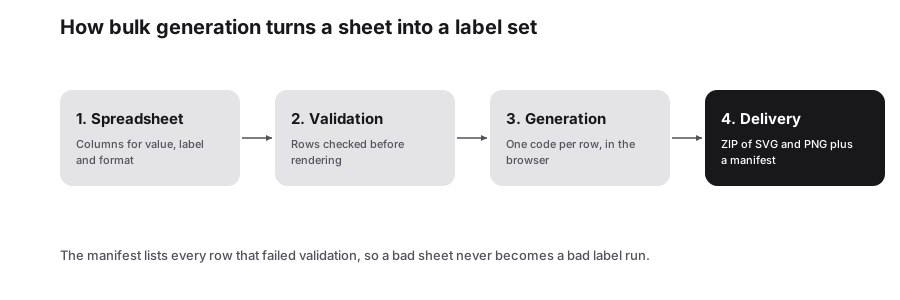
Fill in the template
Download the barcode template and enter the data and symbology for each row, plus a label to use as the file name.
- 2
Upload and review
Upload the .xlsx, .xls or .csv file, or paste rows. Search and preview the results to check each barcode before exporting.
- 3
Export
Download a ZIP of PNG or SVG images, a results spreadsheet, or a printable PDF sheet for your office or label printer.
Features
- Code 128, EAN-13, UPC, Code 39 and ITF-14 in one file
- Excel, CSV and Google Sheets templates
- ZIP of PNG or SVG barcodes named from your labels
- Printable PDF sheet for labels and shelf tags
- Data Matrix, Aztec and PDF417 bulk in the same studio
Template layout and symbology values
The barcode template has four columns: Barcode Data, Symbology, Label / Filename and Notes. The Symbology column takes one of five values, and you can mix them freely within a single file:
Retail codes such as EAN-13 and UPC must use numbers assigned through GS1 if the products will be sold in stores; the generator draws the barcode but does not issue numbers. For internal stock, bins and assets, Code 128 is usually the best choice because it is compact and handles both letters and digits.
| Symbology value | Data it accepts | Typical use |
|---|---|---|
| CODE128 | Letters, digits and symbols | Shipping labels, internal SKUs, asset tags |
| EAN13 | 12 digits plus a check digit | Retail products outside North America |
| UPC | 11 digits plus a check digit (UPC-A) | Retail products in the US and Canada |
| CODE39 | Uppercase A-Z, 0-9, space and - . $ / + % | Industrial, automotive and government labels |
| ITF14 | 13 digits plus a check digit | Cartons and outer cases of retail goods |
Need 2D codes too?
The same Bulk Studio handles 2D symbologies. Switch to the 2D category to use a template with Matrix Data, Symbology, Label / Filename and Notes columns, where Symbology is datamatrix, aztec or pdf417. Data Matrix suits small parts and electronics labeling, Aztec is common on transport tickets, and PDF417 appears on ID cards and shipping documents. Previews, ZIP downloads and PDF sheets work exactly the same way.
Printing barcodes that scan the first time
- Export SVG for thermal and laser label printers so bars stay sharp at any size.
- Never stretch or squash barcodes in one direction only; uneven scaling distorts bar widths.
- Keep the quiet zones on both sides clear, at least ten times the width of the narrowest bar.
- Print dark bars on white or another light background; red bars are invisible to many laser scanners.
- Turn on text labels so staff can type the number if a scan fails.
- Test a printed sample with the actual scanner used at your till or in your warehouse.
Frequently Asked Questions
Can I mix different barcode types in one upload?
Yes. Each row has its own Symbology value, so one file can contain Code 128 asset tags, EAN-13 product codes and ITF-14 carton labels together. The studio generates each row with the symbology you specify and names the files from the Label / Filename column.
Do I get official retail barcode numbers here?
No. PureTools turns numbers you already have into barcode images. Products sold through retailers need GTINs assigned by GS1 or your national GS1 organization. For internal stock, shelving or assets, you can create your own numbering scheme and encode it with Code 128 or Code 39.
Which format is best for warehouse labels?
Code 128 is the usual choice for internal labels because it encodes letters, digits and symbols compactly. ITF-14 is standard for printing on corrugated cartons. For tiny items, or when you need more data in less space, consider Data Matrix from the 2D template in the same studio.
Can I generate Data Matrix, Aztec or PDF417 codes in bulk?
Yes. Choose the 2D category in the Bulk Studio and use its template, which has Matrix Data, Symbology, Label / Filename and Notes columns. Enter datamatrix, aztec or pdf417 as the symbology. Export options are the same: a ZIP of PNG or SVG images, a results sheet or a PDF.
Is my product data uploaded anywhere?
No. Your spreadsheet is read in the browser and the barcodes are drawn on your device, so SKU lists, prices and notes are not sent to a PureTools server. Large files depend on your computer's speed, so split very long lists if the page becomes slow.
Related generators
- Create Linear Barcodes Online in Every Common FormatPick a symbology, type your value and download a print-ready barcode in seconds. Code 128, EAN-13, UPC-A, Code 39, Code 93, ITF, MSI, ITF-14, Codabar and Pharmacode are all in one studio.
- EAN-13 Barcode Generator for Retail ProductsType your 12-digit GTIN and the check digit is calculated for you. Download crisp EAN-13 artwork for packaging, labels and marketplace listings.
- Code 128 Barcode Generator for Labels and InventoryThe most versatile linear barcode. Encode SKUs, serial numbers and tracking IDs with letters, digits and punctuation, then download sharp label artwork.
- Data Matrix Code Generator for Parts, Pharma and LabelsEncode serial numbers, URLs and GS1 data in a tiny square that stays readable even when partly damaged. Download vector files for marking and printing.